

Abstract
1 Introduction
Hydrography is experiencing one of the most agitated periods in its history, where the demand for more accurate and fast-updated bathymetric data is growing (Pe’eri & Dyer, 2018; Kastrisios et al., 2023). Driven by ambitious projects such as the “Nippon Foundation – GEBCO Seabed 2030 Project” (Mayer et al., 2018), which has mapped about 20 % of the world’s ocean floor and seeks to complete the whole ocean mapping by the year 2030, multiple technologies have been developed and incorporated into hydrographic surveys (Ferreira et al., 2022), increasing the level of complexity and workload. At the same time, the hydrographic data production systems have faced the challenge of migrating to new international standards, the IHO S-100 Universal Hydrographic Data Model, that will require straightforward access to high-quality digital geospatial information to support marine activities (Ponce, 2019; Jonas, 2021). As new sensor technologies and data outputs have emerged, so too have a range of spatial interface technologies and research. Technologies, such as any degree of mixed reality (Milgram & Kishino, 1994) offer significant potential to provide users of geospatial data with new ways to perceive, explore, communicate, and experience underwater environments through interface technologies that can both immerse us in data and, through them, immerse us in the spaces they represent (Hedley, 2017; Speicher et al., 2019; Rokhsaritalemi et al., 2020, Hedley & Lochhead, 2020, Çöltekin et al., 2020, Lochhead & Hedley, 2021).
1.1 Background
Many national governments are signatories to the International Maritime Organization’s International Convention for the Safety of Life at Sea (SOLAS; IMO, 1974), reflecting their commitment to ensuring maritime safety through the publication of nautical charts, navigational publications, and supporting services. Therefore, each national Hydrographic Office (HO), or national hydrographic service, is responsible for producing and updating their countries’ official nautical documents and establishing policies governing this work (Maia et al., 2017). These efforts are supported by data from hydrographic surveys conducted by government institutions and authorized researchers operating within national jurisdictional waters. The data collected are typically stored in centralized databases, serving as the foundation for generating and maintaining nautical products (National Centers for Environmental Information, 2024).
Each HO has policies and directives on evaluating and using bathymetric data (Maia, Florentino and Pimentel, 2017). Some choose to use automatic systems and algorithms (Calder & Mayer, 2003; Pe’eri & Dyer, 2018; Wölfl et al., 2019), but it is common practice for experienced hydrographic analysts to verify it in some offices (Le Deunf et al., 2020). Visualizing the data is one of the main ways the analyst verifies, manipulating the data set through peripherals such as a keyboard and mouse and using computer screens to display the images. The verification predominately consists of repetitive manual tasks seeking to identify failures in acquiring raw data and processing errors that alter the acquired bathymetry (Masetti et al., 2022). During verification, the analyst uses one or more specific software for bathymetric data processing, ordinarily available on the market (Value Market Research, 2021). These programs, developed by companies based on the guidelines published by the International Hydrographic Organization (IHO), offer various data verification tools (Langhorst, 2022). This way, traditional 2D planar media was consolidated, adding pseudo-3D visualization features and using computer monitors and presentation room projector screens.
If, a few decades ago, the methods of acquiring and processing bathymetric data were limited to a few options, in recent years, hydrographic practices, led by a worldwide effort to develop systems, sensors, and alternative techniques for depth measurement, have increasingly seen the emergence and expansion of automated and autonomous technologies (Smith Menandro & Cardoso Bastos, 2020; Masetti et al., 2022). This growth in the production of bathymetric data has led hydrographic surveys to generate enormous amounts of information from multiple sources (Holland et al., 2016; Jonas, 2023), which requires adequate processing, analyzing, and managing (Wlodarczyk-Sielicka & Blaszczak-Bak, 2020; Le Deunf et al., 2023). Software for acquiring, processing, and managing bathymetric data has developed significantly to adapt to the reality of activities carried out in hydrography, seeking to respond to current demands and bringing efficiency (Langhorst, 2022).
In parallel to this evolving landscape of hydrographic sensors and data production, new spatial interface technologies such as augmented reality (AR) and mixed reality (MR) have begun to attract attention for their potential to allow inherently 3D/4D data to be viewed and experienced in 3D and 4D. Thus, holding the potential to transform how hydrographic data is perceived and interpreted. These immersive technologies offer novel ways to visualize complex datasets by presenting information in three dimensions and allowing users to interact with data spatially. Their integration into hydrographic workflows may offer advantages in terms of spatial awareness, depth perception, and task performance, particularly in contrast to conventional 2D desktop interfaces.
Interface technologies are essential as they act as the conduit through which users interact with and interpret complex data visualizations. These technologies determine how information is displayed and influence user engagement, comprehension, and decision-making processes. Empirical studies on their potential influence are crucial because they provide evidence-based insights into how different interface designs affect user perception, cognitive load, and overall usability. By understanding these impacts, designers can create more effective and intuitive visualizations that serve diverse user needs, ultimately enhancing the ability to derive meaningful insights from data (Few, 2024).
Specifically, in bathymetric data analysis, interface technologies are fundamental in enabling the effective visualization and interpretation of complex underwater terrain data. High-resolution bathymetric maps, essential for marine navigation, environmental monitoring, and resource management applications, rely heavily on sophisticated visualization tools. These tools must present data in an accessible and intuitive manner, allowing users to explore and manipulate the data effectively.
Research has shown that advanced data acquisition methods, such as single-beam and multi-beam echo sounders (SBES), significantly enhance the accuracy and efficiency of underwater mapping. These technologies produce detailed and reliable bathymetric data, but their complexity necessitates robust interface technologies to manage and interpret the information accurately. For instance, multi-beam echo sounders (MBES) are favored for their ability to cover large, high-resolution areas. However, they require sophisticated interfaces to process and visualize the vast data collected (Araujo & Hedley, 2023; Li et al., 2023).
Empirical studies on these technologies are crucial to understanding their impact on user perception and usability. Effective interface design can reduce cognitive load and improve the accuracy of data interpretation, which is particularly important in fields that rely on precise and timely information. By continually evaluating and refining these technologies based on empirical evidence, we can enhance the overall effectiveness of bathymetric data analysis, ensuring that users can make well-informed decisions.
While different methods and interface options exist for viewing bathymetric data, the hydrography community continues to follow the 2D paradigm in which displayed marine information resembles traditional paper nautical charts, even in the most recent chart-plotters. However, there has been growing discussion around the benefits of presenting hydrographic information in more immersive and familiar forms, similar to those found in video games, through 3D visualization or AR-based environments (Hedley and Lochhead, 2020, Lochhead and Hedley, 2021, Jonas, 2023). The emergence and development of new data products and new spatial interface technologies may significantly support the ability of a range of operational stakeholders to perceive and interpret multidimensional bathymetric data. Therefore, there is a need to investigate the potential of emerging tools and interfaces to improve bathymetric data visualization.
1.2 Research objectives and questions
This exploratory research aims to investigate and quantify potential changes in perception and task performance when transitioning the visualization of raw bathymetric data from conventional interfaces to tabletop AR interfaces. This study seeks to uncover underlying patterns and relationships by employing exploratory research methods. It specifically addresses three overarching questions. First, it investigates whether perceptual outcomes differ when users visualize data in AR versus conventional interfaces, particularly regarding users’ abilities to identify spatial features and interpret spatial relationships within hydrographic datasets. Second, it assesses task performance by comparing accuracy and speed across both platforms. Third, the study explores the suitability of AR interfaces for daily hydrographic data analysis, identifying affordances users perceive as beneficial and pinpointing characteristics that users find challenging or detrimental for effective data visualization and operational integration. Ultimately, this research aims to identify critical factors and variables influencing user experience and performance, providing a foundation for subsequent research to pursue more targeted studies of contributing factors in the geometry and dimensionality of 3D/4D hydrographic and bathymetric data, interface parameters, visualization features, individual differences, and venue characteristics. Our work aims to be a catalyst for these future studies and contributing to the development of improved visualization techniques for bathymetric data interpretation.
2 Related work
In recent decades, the hydrographic community has successfully migrated its nautical products from analog to electronic models, producing them consistently and standardized based on the standards published by the IHO (Ponce, 2019). The databases could also add object and attribute data to the traditional bathymetric data, stimulating the use of Geographic Information Systems (GIS) as part of the hydrographers’ toolset (Lekkerkerk, 2018).
However, these digital variants have mainly followed the printed models, maintaining that the presentation is two-dimensional (Jonas, 2023). In other words, the entire creation and later use of nautical charts continue to be essentially visualized in 2D displays, occasionally employing aids of perspective renderings of data on screens like pseudo-3D representation. Over time, the influence and limitations of the IHO standards, especially the IHO S-57 Transfer Standard for Digital Hydrographic Data, may be one of the reasons why different methods and interface options for viewing bathymetric data, such as new 3D interactive visualization interfaces, were not being exploited and taken advantage of (Alexander et al., 2007; Ward et al., 2008; Duan et al., 2021).
Since hydrographic data survey technologies inherently generate 3D data (Bleisch, 2012), tools that provide 3D data processing and 3D data visualization are vital to support interpretation. Modern data processing software has offered features that allow the visualization of a set of bathymetric data from different perspectives, taking advantage of interactive features, where the 3D impression is received through rotation of the model on the computer screen (Lütjens et al., 2019), contributing to the perception and understanding of spatial information.
2.1 Augmented reality
AR is a technology in which information (virtual objects) is superimposed onto the real world directly in front of observers (Milgram & Kishino, 1994; Azuma, 1997). Essentially, AR ‘augments’ views of reality by integrating virtual computer-generated content into the user’s view of their physical environment. This allows users to interact with digital elements as if they were part of the real world, providing an enriched and interactive experience (Azuma, 1997; Hedley, 2017). AR interfaces are made possible by three main ingredients: tracking of real-world surroundings; registration of virtual objects to the real world – when a virtual piece of furniture in an AR application is precisely positioned and aligned within a user’s physical room, matching its real-world location, orientation, and scale; and rendering virtual content into views of the real world – made visible by a range of display technologies (Hedley, 2017). Tracking is especially crucial for 3-D applications that involve user interaction with virtual spaces, as it provides the system with real-time spatial information about the user’s position and orientation. Accurate and low-latency tracking ensures that virtual content remains stably aligned with the real world, preserving immersion and usability (Billinghurst et al., 2015). In AR, tracking determines the positions of real-world objects, allowing digital objects to be registered to them. This can be done using fiducial markers and computer vision software, where unique patterns are recognized, and their orientation and position relative to the camera’s viewpoint are calculated. This enables the AR software to render virtual objects at the correct location and alignment, a method commonly used in tangible AR (Shelton & Hedley, 2002, 2004).
AR systems could use monocular, binocular, and biocular presentations (Kitamura et al., 2014, 2015). A binocular system presents the information using two optical trains, one for each eye. In contrast, a biocular system has only one optical train, and the aperture is large enough to simultaneously observe both eyes.
AR capability can be achieved through combinations of sensors and cameras integrated with display and interaction devices, computer vision software, and thoughtful interface design. Different designed implementations can offer advantages for specific applications (Van Krevelen & Poelman, 2010). Advances in camera, GPS, accelerometer, and display technologies in mobile devices have led to using tablets and smartphones as AR displays (Hedley, 2017). Smartphones and tablets are among the most accessible devices, using their cameras and screens to display AR content (with the metaphor of an AR ‘lens’), thus bringing AR applications to a broad audience. Head-mounted displays (HMDs) can arguably provide a more immersive experience by filling the user’s entire field-of-view (FOV) with augmented views of reality. Optical see-through HMDs allow users to see the real world directly with digital content superimposed, making them ideal for applications requiring high interaction with the physical environment, such as medical or industrial uses (Carmigniani et al., 2011). Video see-through HMDs, which capture the real world with cameras and display the combined content on screens within the headset, offer better integration of digital elements but may encounter latency issues. Improvement and evolution of wearable virtual reality (VR) devices have increased considerably over the past few years. Devices such as the Meta Quest 3 can be loaded with standalone VR and AR software to enable unwired VR and AR experiences (Speicher et al., 2019). Furthermore, progress in camera and computer vision technology has resulted in increased performance with inside-out tracking by these headsets (for position and context as a basis for registration), enabling users to use the same headset for immersive VR and ‘pass-though AR and ‘pass-through mixed reality (MR), using the outward-facing cameras on these devices.
2.2 Rationale for choice
This research aims to fill a gap in the ocean data research community. While early work has been done to integrate AR with seafloor data visualization (Palmese & Trucco, 2008), work to study whether such interfaces support effective hydrographic practice is almost nonexistent to date.
Comparing tabletop AR interface visualization with conventional desktop 3D monitor visualization is essential for understanding the advantages and limitations of each approach in bathymetric data interpretation. A tabletop AR interface is an interactive visualization platform where virtual 3D content is overlaid onto a real-world surface, such as a physical table, through the use of AR technology. Typically, users wear AR head-mounted displays (HMDs) or utilize handheld devices, enabling them to see and manipulate virtual objects appearing as if they are physically present on the tabletop. Traditional desktop 3D monitors offer high-resolution displays and familiar interfaces, while tabletop AR interfaces potentially enhance spatial awareness and interaction by integrating digital information with the physical environment (Jo et al., 2021; Turhan & Gümüş, 2022). This comparative analysis aims to determine whether the immersive and interactive nature of AR provides significant improvements in user perception and task performance. Identifying these differences is crucial for developing practical visualization tools that enhance data interpretation accuracy and efficiency, ultimately leading to better decision-making in fields relying on precise bathymetric data.
This comparison is the first step toward a comprehensive and systematic empirical evaluation of mono versus stereo AR and stereo AR versus stereo VR. By establishing a baseline understanding of how AR interfaces compare to traditional 3D monitors, we can design more effective experiments to explore the nuances of stereoscopic visualization. Subsequent studies will delve into the impact of depth perception, spatial awareness, and user interaction on task performance and perception, providing a holistic view of these advanced visualization technologies. The insights from this research will inform the development of optimized visualization tools tailored to specific applications and user needs, enhancing the effectiveness and usability of AR and VR systems in various professional and scientific domains.
3 Empirical methods and materials
This study investigates whether tabletop AR interfaces may enhance perception and task performance in interpreting raw bathymetric data compared to conventional desktop 3D visualizations. It uses exploratory methods to examine how interface type influences user experience, accuracy, and efficiency. The central hypothesis is that users interacting with bathymetric data through a tabletop AR interface may demonstrate improved spatial perception and task performance – such as accuracy and efficiency in interpretation – compared to users using a conventional desktop 3D visualization interface. Findings aim to inform future research and support the development of more effective bathymetric visualization techniques.
3.1 Study procedure
This study employed two 3D visualization interfaces with distinct visual cues to investigate their effects on subjects’ data perception. The motor aspects of interaction with 3D visualizations were not considered in this project, as the processing and analysis of bathymetric data – routinely performed by hydrographic analysts – require substantial manipulation of the viewpoint. In other words, bathymetric data are not processed or analyzed from a static, single perspective. Since the participants’ motor activity, such as actions for navigating the terrain, was not measured, we utilized typical control devices, such as a computer mouse, to interact with the visualizations.
The study involved the following steps: Participants navigated to a designated survey website1. They read and agreed to a consent form outlining the survey’s terms, their rights and protections, and contact information for inquiries. Participants completed a survey comprising 52 questions, which included checking boxes, ranking options, and providing short answers, using both desktop and mobile device-based data visualization tools.
The recorded data included participants’ responses to the online questionnaire. This data was securely stored in an SFU-supported facility, protected by passwords and encryption. The information collected during the study was kept confidential and used solely for research purposes. No raw survey data was shared with commercial partners, though graphical summaries of aggregated data might have been included in academic publications. No participant names were collected, ensuring no participants were identifiable. The study did not collect any identifying information about participants, ensuring their privacy was maintained. There were no foreseeable risks to participating in this survey. Participants performed simple tasks involving viewing and interpreting 3D data visualizations while sitting at a desk in DHN’s regular office, using everyday devices such as a typical desktop computer, smartphone, or tablet with a camera. Participation in the study was voluntary and unpaid.
The experiment was divided into two identical phases, Interface DT and Interface AR, with the execution order alternating between the groups involved. The first group performed tasks using the standard desktop interface (Interface DT) and the augmented reality interface (Interface AR). Conversely, the second group performed the same tasks but started with Interface AR before using Interface DT. Given the use of two datasets in the research, two questionnaire versions were created (A and B), with the order of model use reversed. Consequently, the experiment was conducted in four distinct configurations: Group A, Group B, Group A (inverted), and Group B (inverted).
After consenting to the form, the volunteer is invited to complete a background/operational survey. Following a familiarization period, the experiment begins using one of the interfaces. The volunteer identifies and compares pre-selected points from visualized bathymetric data. A researcher monitors each task, measuring the time it takes to complete it and recording the volunteers’ answers during the AR interface phase. During the DT interface phase, the volunteers answer the questions independently.
Upon completing all tasks, the volunteer is invited to answer a post-experiment questionnaire regarding their experience. Then, the volunteer visualizes another 3D model using the other interface and performs identification and comparison tasks with different pre-selected bathymetric data points, manipulating the device to obtain the answers.
After completing all tasks with the second interface, the volunteer is invited to answer a second post-experiment questionnaire about their experience. Upon completing both stages of the experiment (desktop and AR interfaces), the volunteer responds to a final reflective questionnaire comparing the two stages (Fig. 1).
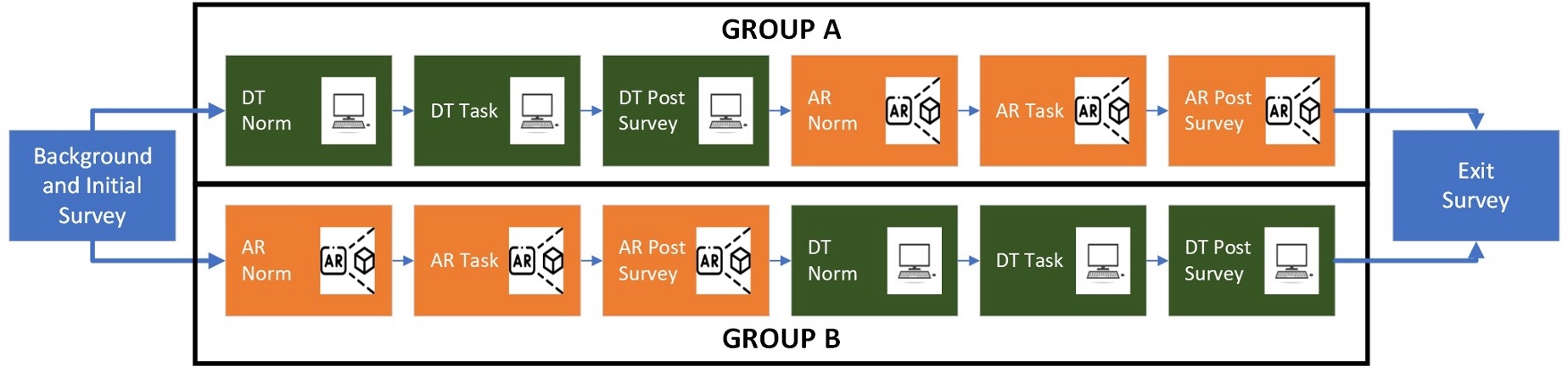
3.2 Display interface technologies used
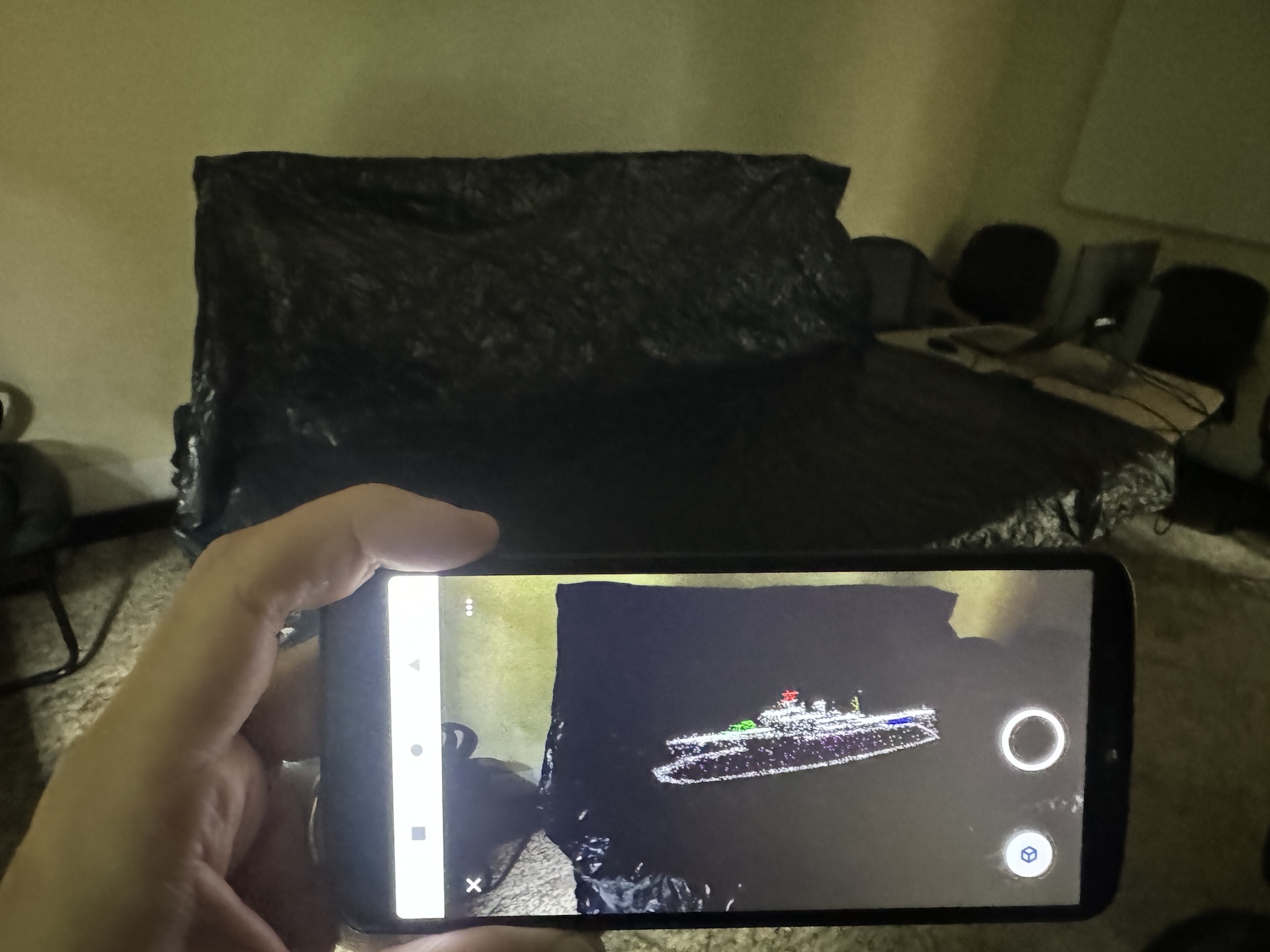
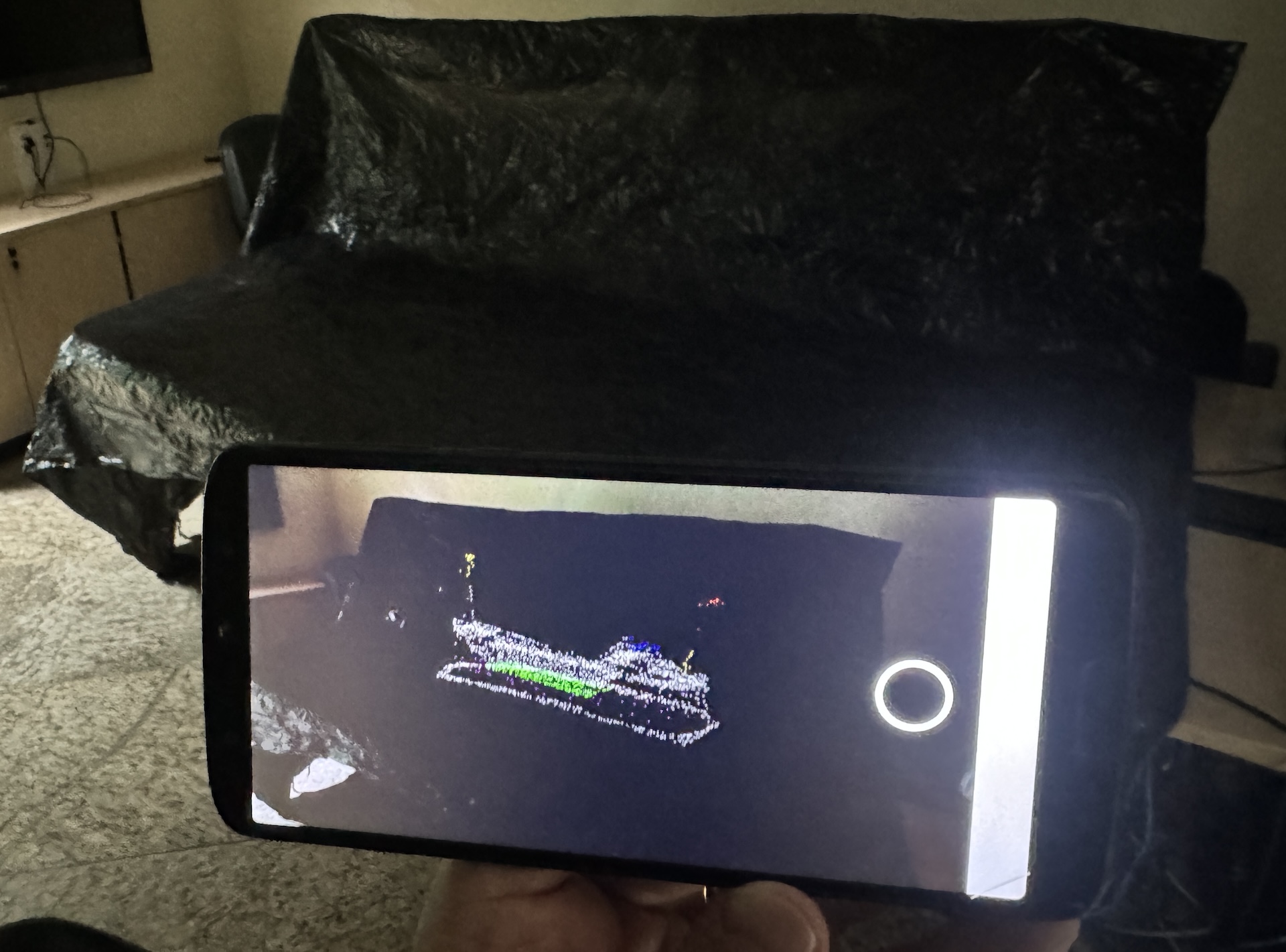
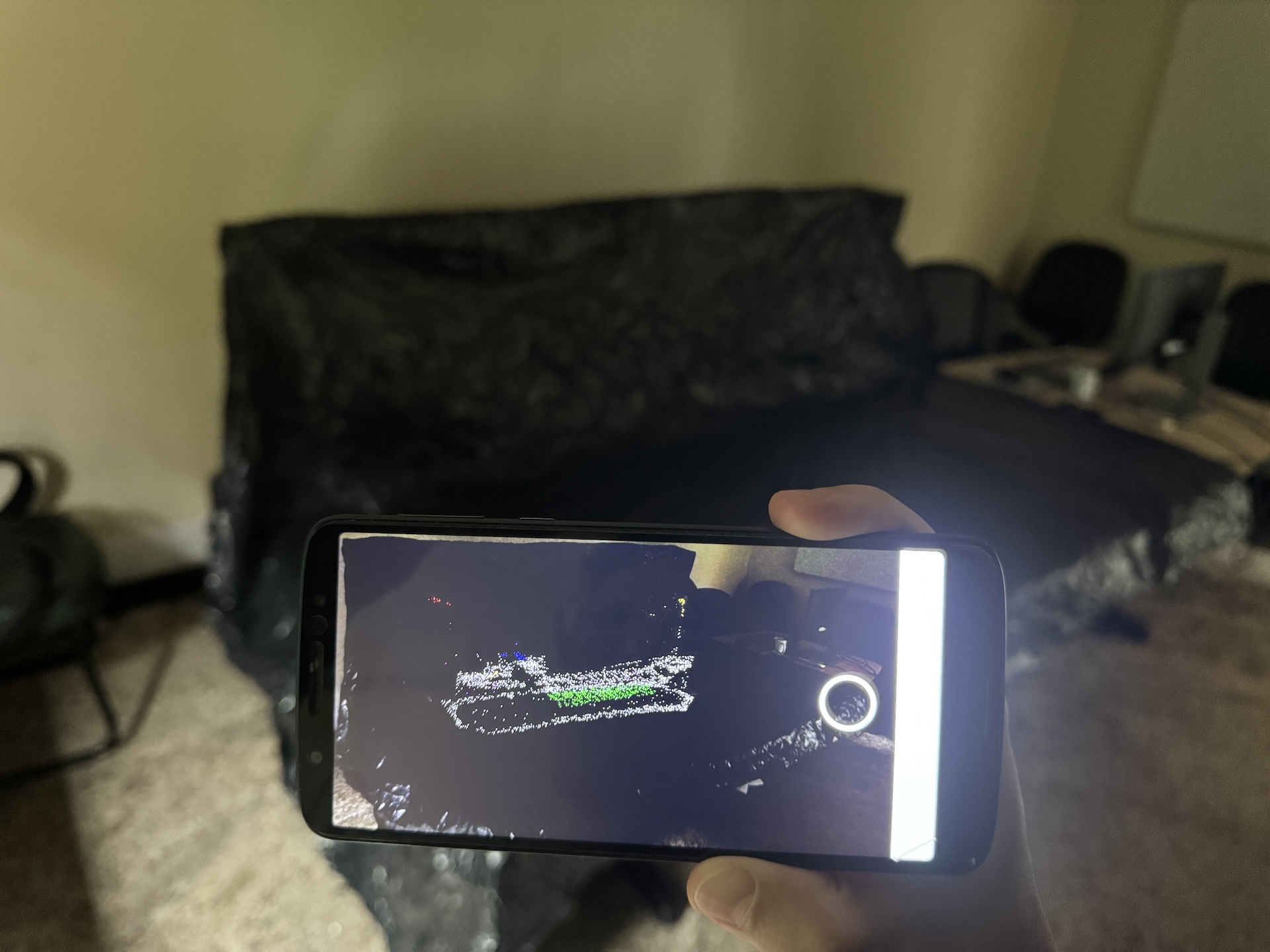
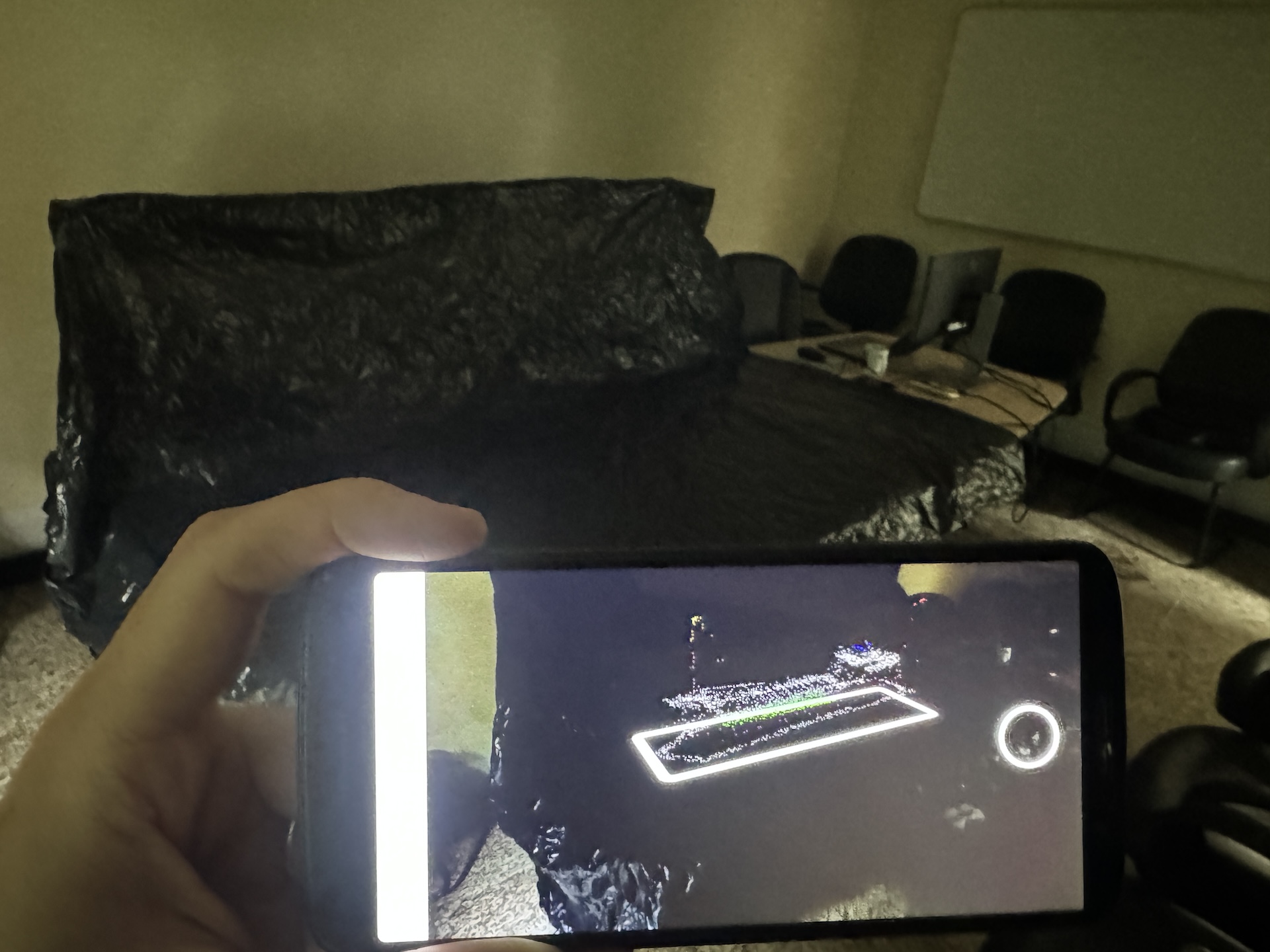
Two interfaces were used to view and manipulate the 3D models: the desktop interface (Interface DT) and the augmented reality interface (Interface AR; Fig. 2).
The desktop interface consisted of a flat-screen monitor and a standard mouse placed on a table. Participants were seated during interaction. Using the mouse’s three buttons, users could rotate, translate, and zoom in and out on the model.
The AR interface, by contrast, used a handheld mobile device (smartphone) to project the 3D model onto the same table in augmented reality. Participants remained standing and were free to move around the table to explore the model from different perspectives. The device’s touchscreen allowed for the model’s rotation, translation, and scaling (Fig. 3). However, because the 3D content was anchored to the tabletop, rotation along axes parallel to the table’s surface was limited.
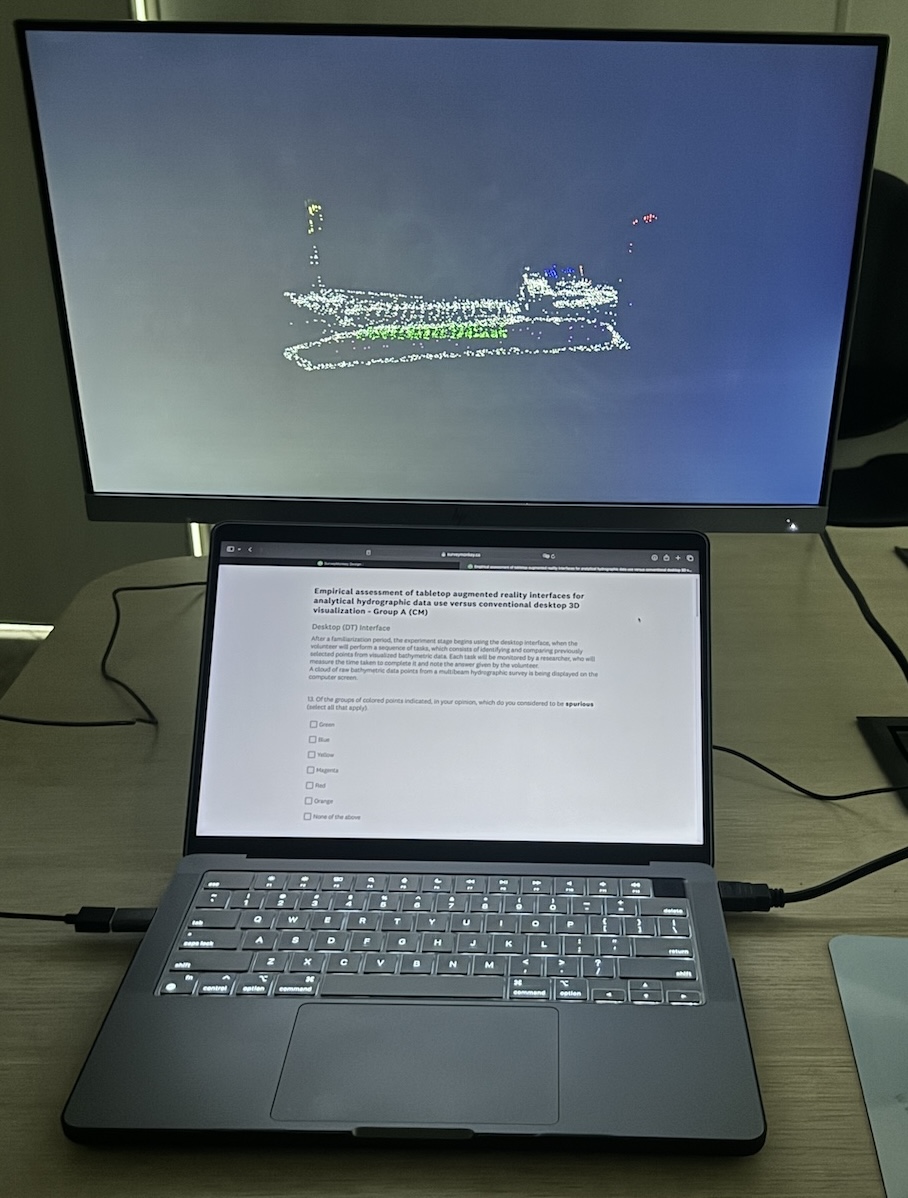
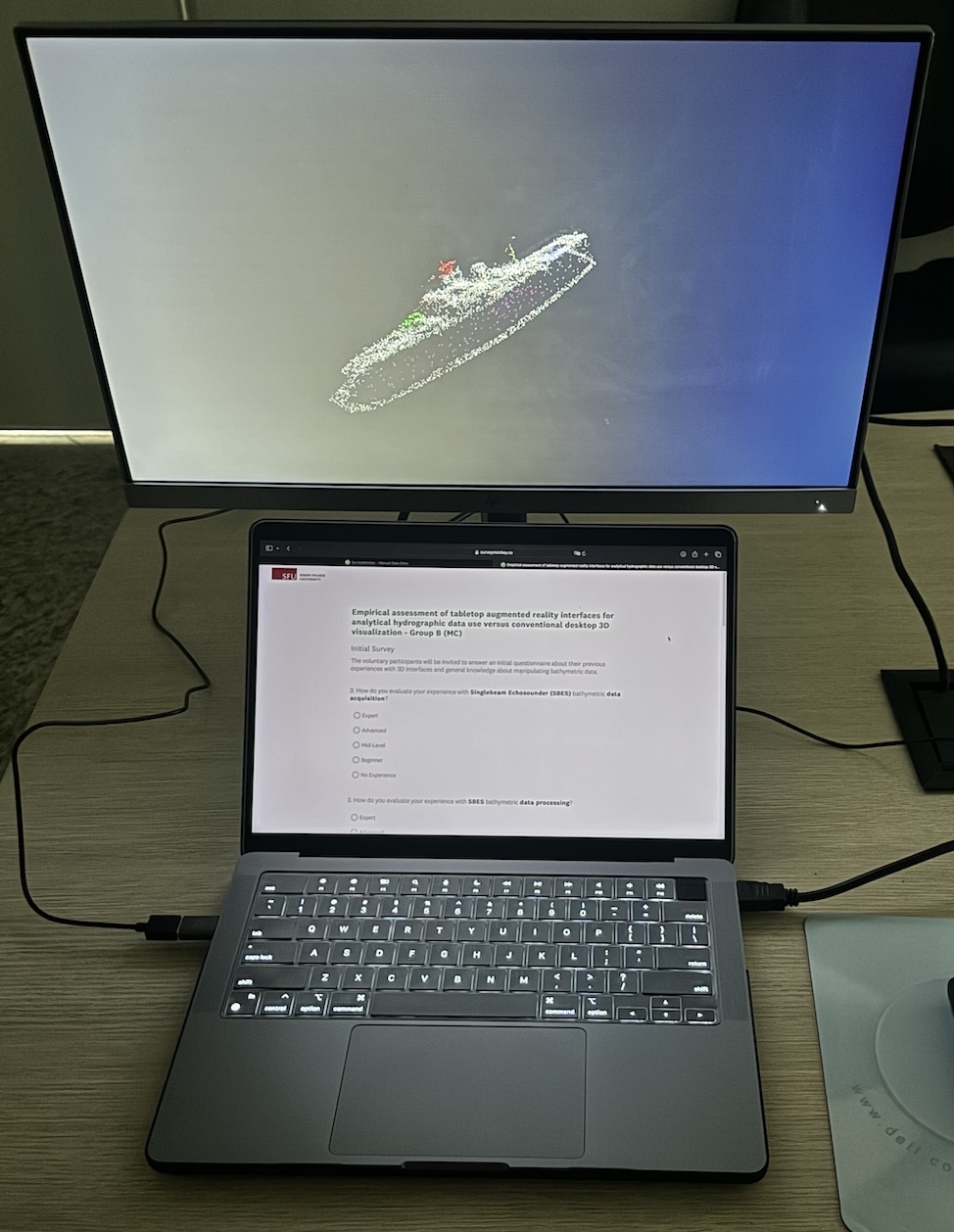
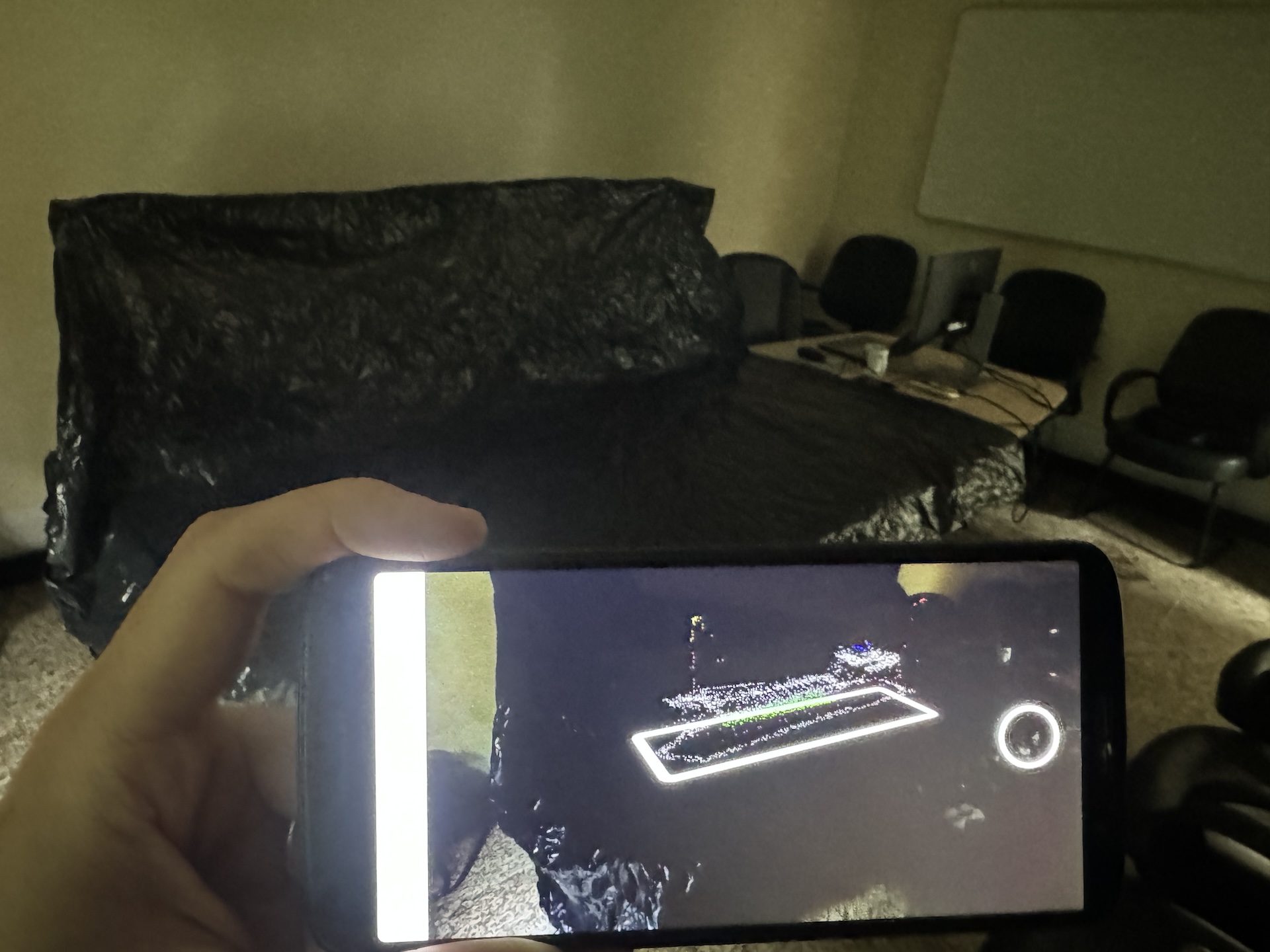
3.3 Bathymetric data used
The experiment used bathymetric data collected from two sunken ships, MV GB Church and HMCS Mackenzie, near Sidney, in October 2019. Using a Kongsberg EM2040P MkII multibeam echosounder aboard the CSL Heron survey boat, owned by the Canadian Hydrographic Service, several survey lines were acquired in each ship’s area. The settings included high-density beam spacing, dynamic dual swath, 300 kHz frequency mode, high-resolution water phase data, and a survey speed of around 6 knots (Gomes de Araujo, 2024). These datasets provided the foundational background for the experimental tasks. Both datasets were employed for both interfaces but were only used once per subgroup. Consequently, each subgroup observed a change in the dataset when transitioning from one interface to another.
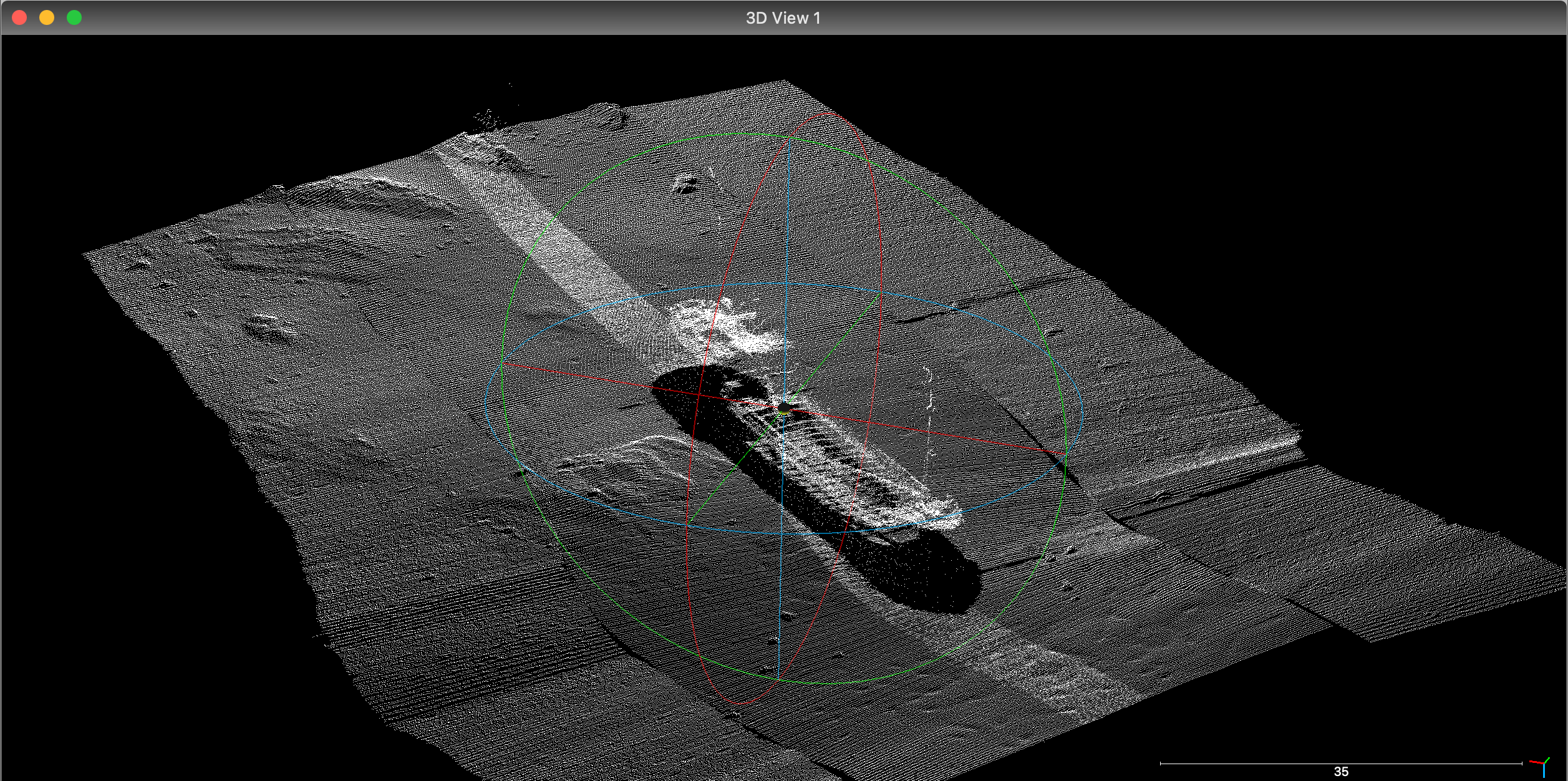
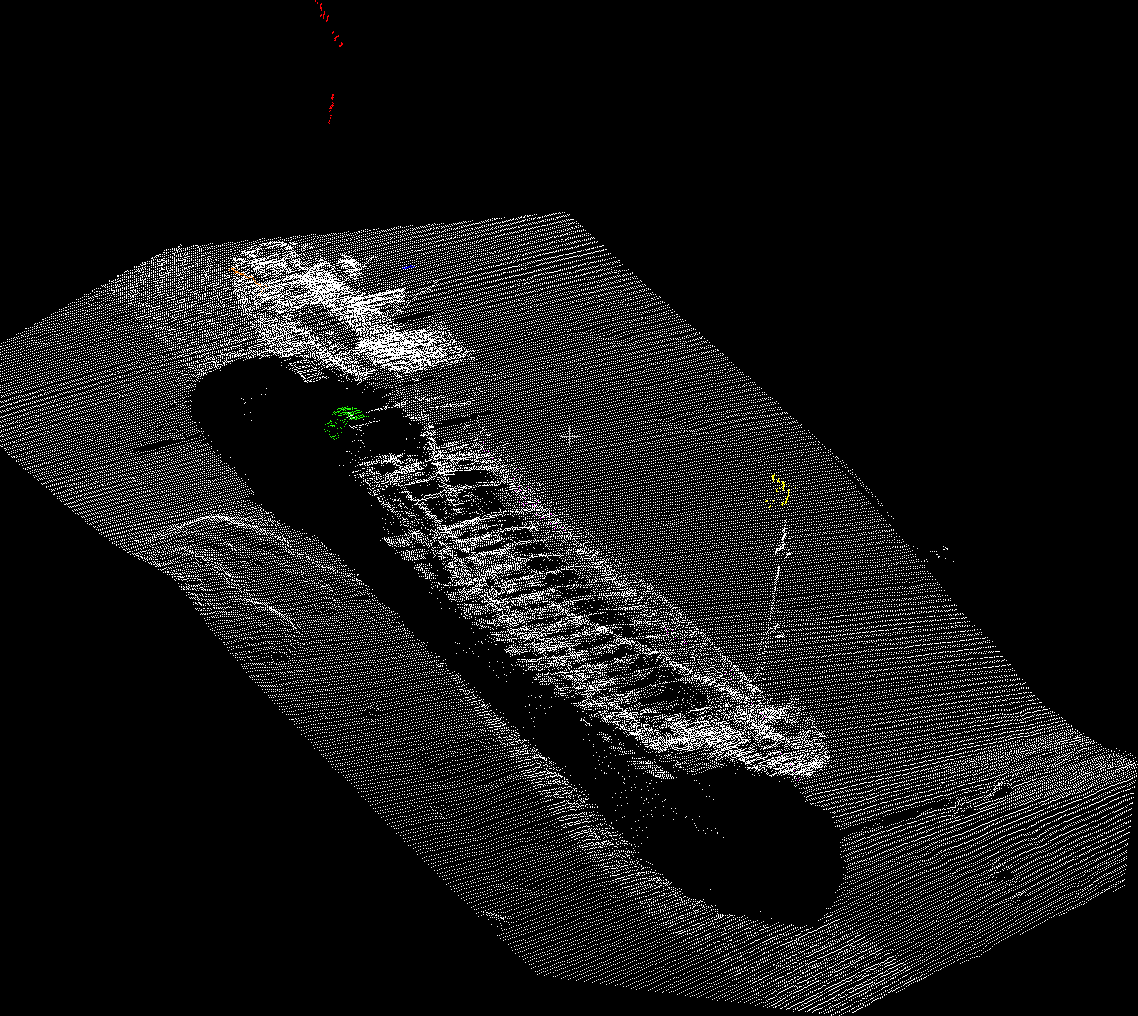
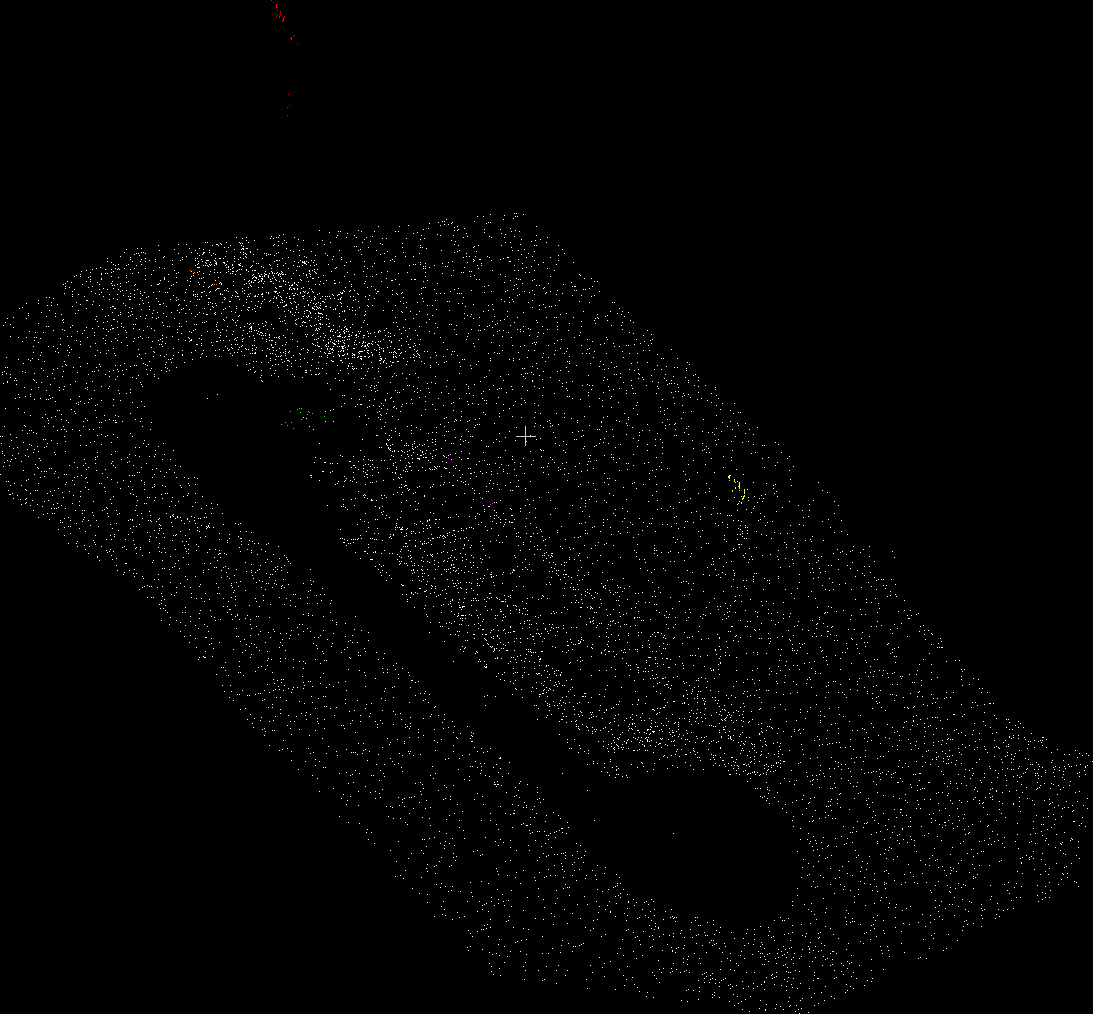
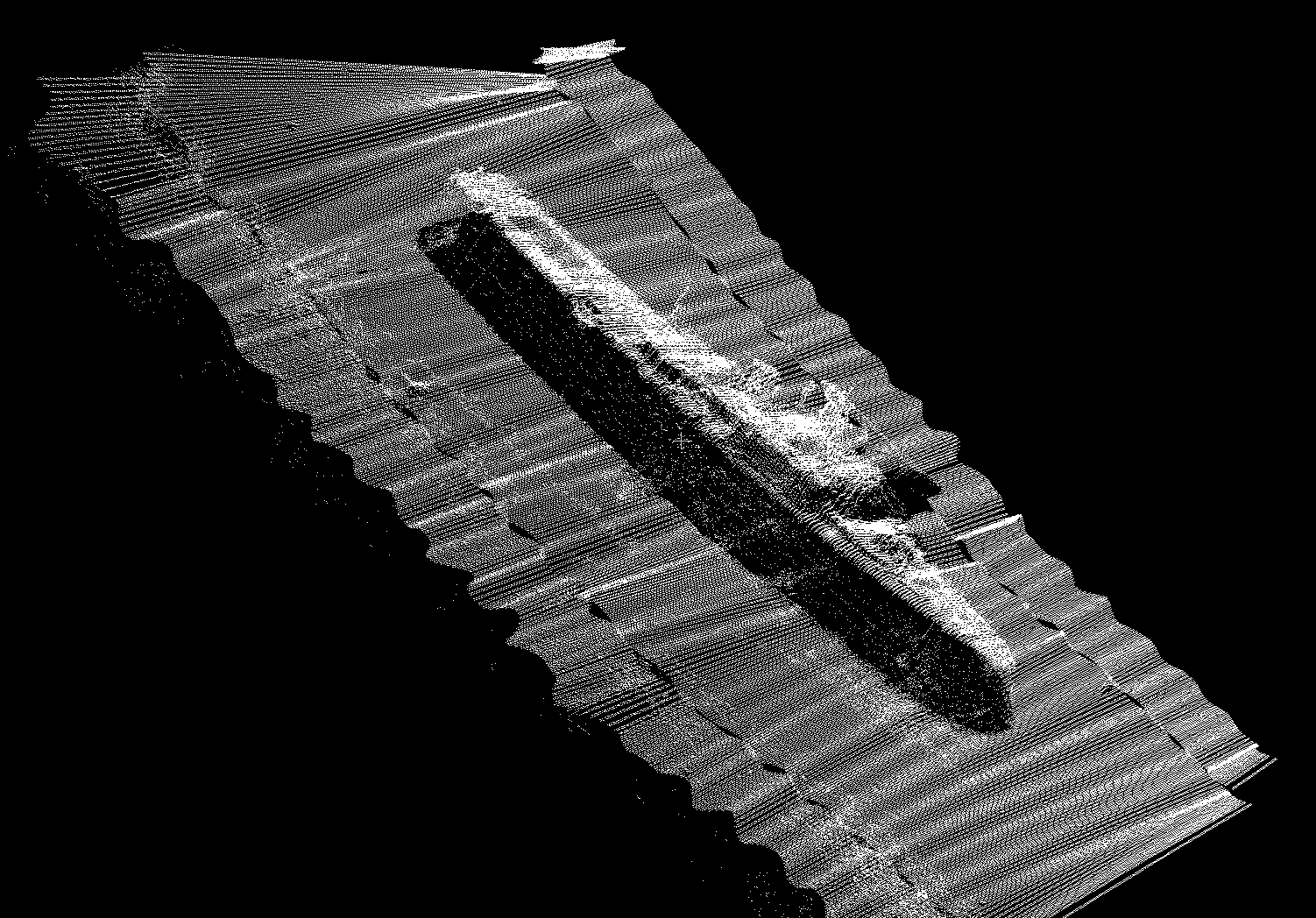
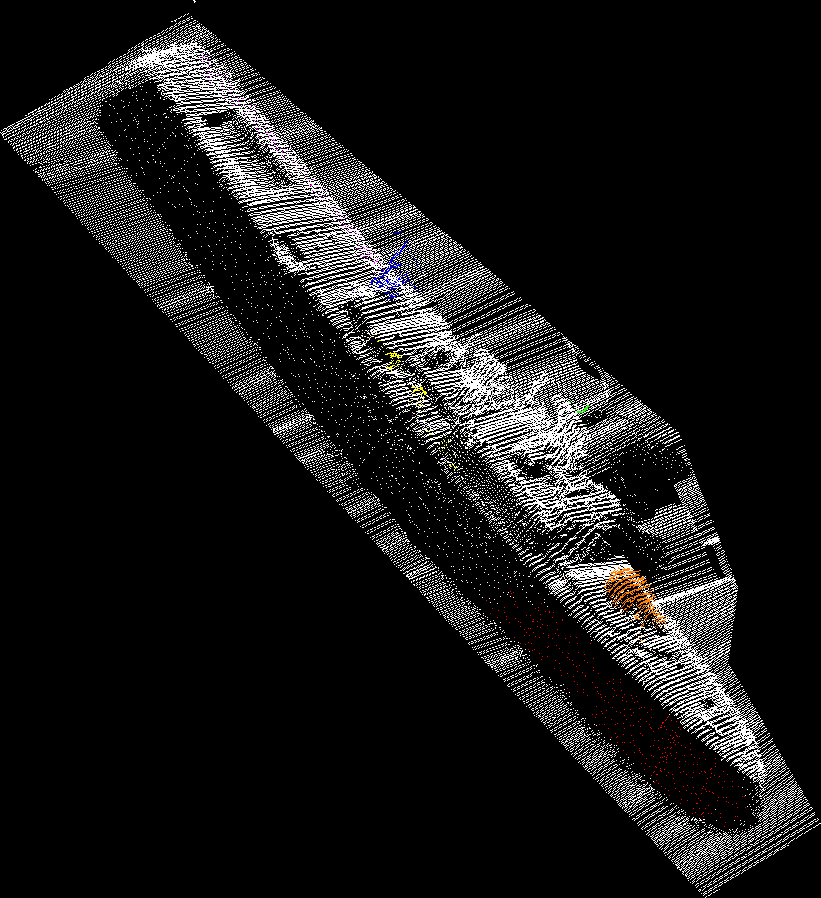
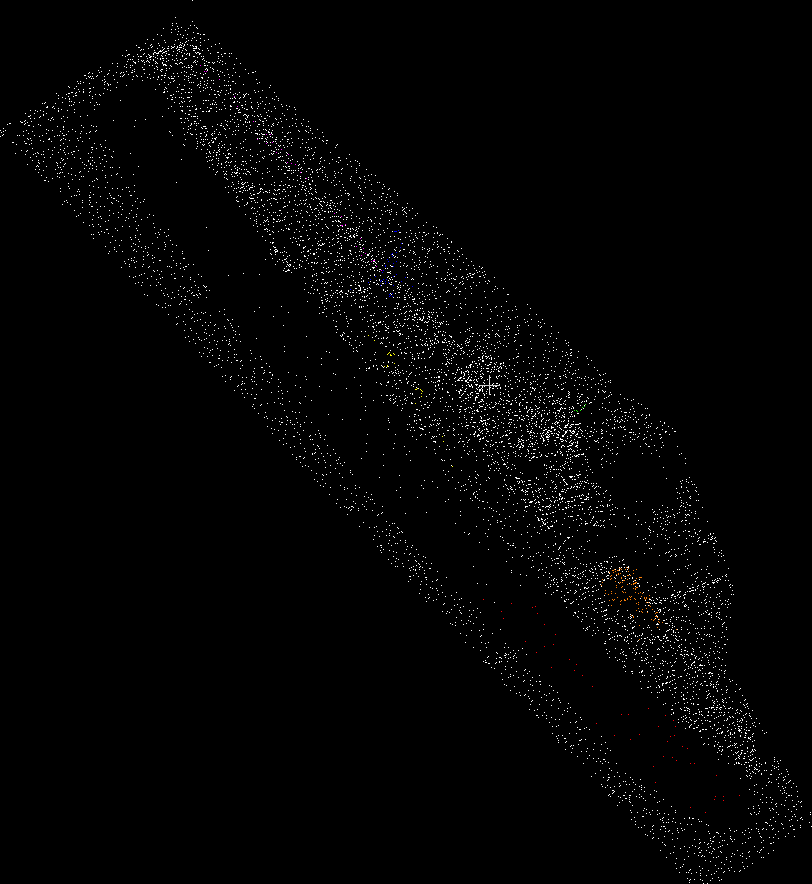
In point cloud format (.txt), the raw data were imported into CloudCompare software — an open-source software designed to visualize, process, and analyze 3D point cloud data – for preparation (Figs. 4a and 5a). The preparation process involved selecting and coloring specific point groups to capture the attention of the experiment participants (Figs. 4b and 5b). Excess data surrounding the ships’ hulls, such as seabed data, was excluded to reduce the total number of points and lighten the files (Figs. 4c and 5c). Additionally, it was necessary to reduce the resolution of both models to accommodate Sketchfab.com’s AR visualization limitations. The Sketchfab.com platform – an online platform that enables users to publish, explore, share, and embed interactive 3D models and visualizations, supports VR and AR, allowing users to experience 3D content in immersive environments without the need for specialized software – was also utilized to convert the point cloud models (in LAS file format) to AR file format (GLTF), which was subsequently used in the experiment.
In both models, six groups of points were selected, with each group assigned one of the following colors: blue, red, yellow, green, orange, and magenta. These colors were chosen for their optimal contrast against a black background. The criteria for selecting the points were as follows:
- One group of points represented spurious data incorrectly acquired by the acquisition system or data typically filtered or excluded during processing. This group was used to test the participant’s ability to identify whether the data was accurate.
- In both models, two vertically adjacent groups of points, not necessarily part of the ship’s structure, were colored red and yellow. These groups were chosen to compel participants to observe the model from a side view.
- Lastly, three groups of points represented features of the ship’s structure. These groups were selected to assess the participants’ ability to perceive small features of the model.
3.3.1 GB Church
The G.B. Church was the Artificial Reef Society of British Columbia’s (ARSBC) first project, initiated in 1989 and completed over two years. The ship was sunk in August 1991 in Princess Margaret Marine Park near Sidney on Vancouver Island. Preparation involved stripping the vessel down to the steel, creating diver access points, and removing hazardous materials to ensure diver safety. The sinking site, chosen for its flat sandy bottom and proximity to dive shops, met all coast guard and navigation requirements. The G.B. Church quickly became a habitat for marine life like octopus and wolf eels, demonstrating the positive impact of artificial reefs on ecosystems and reducing diver traffic on natural and historical sites (Artificial Reef Society of British Columbia, 2024).
In this model (Fig. 4), the red and yellow groups of points represented data that were not considered spurious but were not part of the ship’s structure. The magenta group of points represented spurious data. The blue, green, and orange groups represented features of the ship’s structure.
3.3.2 HMCS Mackenzie
The lead ship of her class, HMCS Mackenzie, was built by Canadian Vickers Limited in Montreal and commissioned on 6 October 1962. Over 23 years, Mackenzie operated in the Pacific with the Second Canadian Destroyer Squadron and Training Group Pacific, participating in various exercises. After 30 years of service, she was decommissioned on 3 August 1993 and sold to the Artificial Reef Society of BC. She was scuttled near Rum Island on 16 September 1995 (Artificial Reef Society of British Columbia, 2024).
In this model (Fig. 5), the orange group of points represented spurious data. All the other groups represented features of the ship’s structure.
3.4 Participants
Participation in this study was entirely voluntary. Participants could choose not to participate without any impact on their employment, partnerships, or services they currently receive.
The participants were 42 volunteer hydrographer analysts and Cartographic Engineers from the Brazilian Navy Hydrographic Office in Rio de Janeiro, Brazil. Their education background ranged from technical to advanced degrees, with professional experience spanning from newly arrived analysts to those who have served for several years at the Hydrographic Office. Their expertise varies from junior to senior levels, and their analytical specialization differs based on the equipment used, such as single-beam or multi-beam sonar systems. Data collection took place in May and June 2024. Participants were recruited via personal contact and were questioned about their experience with 3D visualization and bathymetric data before testing. While all participants had some prior experience with 3D visualization applications, not all had experience with the specific 3D geographical data used in this study. None were familiar with the presented bathymetry models.
The sample was deliberately chosen to explore the performance of experienced users with hydrographic expertise, focusing on perception, identification, and classification tasks. The participants represented nearly all analysts from the BN Hydrographic Office. To balance the order of interface use, participants were divided into two groups (A and B), ensuring an equal number of participants for each interface. All subjects had normal or corrected vision and no motor or movement restrictions.
Both groups had identical experimental conditions, including lighting, temperature, and other environmental factors. Participants consented to the experimental procedure and participated voluntarily, with the option to withdraw at any time. They were instructed to perform tasks with maximum attention and told that precision in answering was more important than speed, though their completion time to answer each question in each task phase would still be recorded.
Due to the anonymous nature of the survey, participants could not withdraw their responses once submitted.
3.5 Background and operational survey
Before the experiment, participants were asked to complete a self-assessment questionnaire to evaluate their prior experience with 3D interfaces and bathymetric data manipulation. Responses were rated across five levels: expert, advanced, mid-level, beginner, and no experience. The questionnaire included the following 11 items:
- How do you evaluate your experience with Single beam Echosounder (SBES) bathymetric data acquisition?
- How do you evaluate your experience with SBES bathymetric data processing?
- How do you evaluate your experience with Multibeam Echosounder (MBES) bathymetric data acquisition?
- How do you evaluate your experience with MBES bathymetric data processing?
- How do you evaluate your experience with bathymetric data feature classification?
- How do you evaluate your experience with desktop 3D data visualization?
- How do you evaluate your experience with Augmented Reality (AR) 3D data visualization?
- How do you evaluate your experience with Virtual Reality (VR) data visualization?
- How do you evaluate your experience with 2D computer or console games?
- How do you evaluate your experience with 3D computer or console games?
- How do you evaluate your experience with AR games?
3.6 Normalization phase
Each task battery began with a normalization phase to minimize disparities in interface handling skills. This familiarization stage allowed participants to practice using the control devices for both the desktop and AR interfaces. Participants were instructed on how to interact with a generic bathymetric dataset containing randomly placed markers. They then practiced manipulating this dataset for three minutes using a mouse and keyboard (for the desktop interface) or the touchscreen of a mobile device (for the AR interface).
3.7 Tasks, scoring and response confidence
The following section outlines the tasks assigned to participants, along with their corresponding item numbers in each questionnaire:
- Q13 (DT Interface) and Q29 (AR Interface) – Of the groups of colored points indicated, which do you consider spurious (select all that apply)?
- Q15 (DT Interface) and Q31 (AR Interface) – Of the groups of colored points indicated, which do you consider part of the sunken ship (select all that apply)?
- Q17 (DT Interface) and Q33 (AR Interface) – Which of the groups of colored points indicated is closest to the sea surface (shallowest depth), regardless of whether the data is spurious?
- Q19 (DT Interface) and Q35 (AR Interface) – How many crane booms can you identify on the ship?
- Q21 (DT Interface) and Q37 (AR Interface) – How many masts can you identify on the ship?
- Q23 (DT Interface) and Q39 (AR Interface) – How would you classify the type of shipwreck?
Tasks a) and b) were scored individually for each group of colored points, resulting in scores ranging from 0 (all incorrect) to 6 (all correct). The remaining four tasks were scored based solely on correct responses.
After completing each task, participants rated their confidence in their responses on a seven-point scale (1 = “Not confident at all” to 7 = “Extremely confident”). This additional measure aimed to provide deeper insights into user certainty, helping to identify potential biases and improve the predictive value and validity of the findings.
3.8 Post survey
Following the completion of all tasks, participants answered a post-experiment questionnaire to evaluate their experience using both interfaces. Questions focused on ease of use for each interface and included:
- Rate your ease of perceiving the horizontal position of the selected points in raw MBES data using AR / DT data visualization interfaces.
- Rate your ease of perceiving the vertical position (depth) of the selected points in raw MBES data using AR / DT data visualization interfaces.
- Rate your ease of identifying whether the selected points are considered spurious data in raw MBES data using AR / DT data visualization interfaces.
- Rate your ease of identifying whether the selected points belong to the structure of the sunken ship in raw MBES data using AR / DT data visualization interfaces.
3.9 Exit survey
After completing both stages of the experiment (desktop and AR environment), volunteers responded to a final reflective questionnaire with comparison questions between the stages performed. For the first four questions, participants indicated whether one of the two interfaces was better or whether there was no difference. The questions included:
- Did either of the two interfaces (desktop or AR) provide a clearer understanding of the spatial horizontal positioning of the groups of colored points in each task?
- Did either of the two interfaces (desktop or AR) provide a clearer understanding of the spatial vertical positioning (depth) of the groups of colored points in each task?
- Did either of the two interfaces (desktop or AR) make identifying parts of ships, such as masts and crane booms, easier?
- Did either of the two interfaces (desktop or AR) support a more straightforward inspection (exploration) of the dataset?
- Do you think the AR bathymetric data visualization prototype you just used would be useful in the everyday hydrographic office workflow?
- In your opinion, which affordances of the AR interfaces do you perceive to support hydrographic office data operations best?
- In your opinion, which characteristics of AR-based data visualization do you perceive to undermine hydrographic data visualization or present challenges that need to be overcome?
- Is there any other feedback you would like to share about these DT/AR interfaces in your workflow?
4 Results
4.1 DT interface vs. AR interface: Background and operational survey
4.1.1 Hydrographic experience
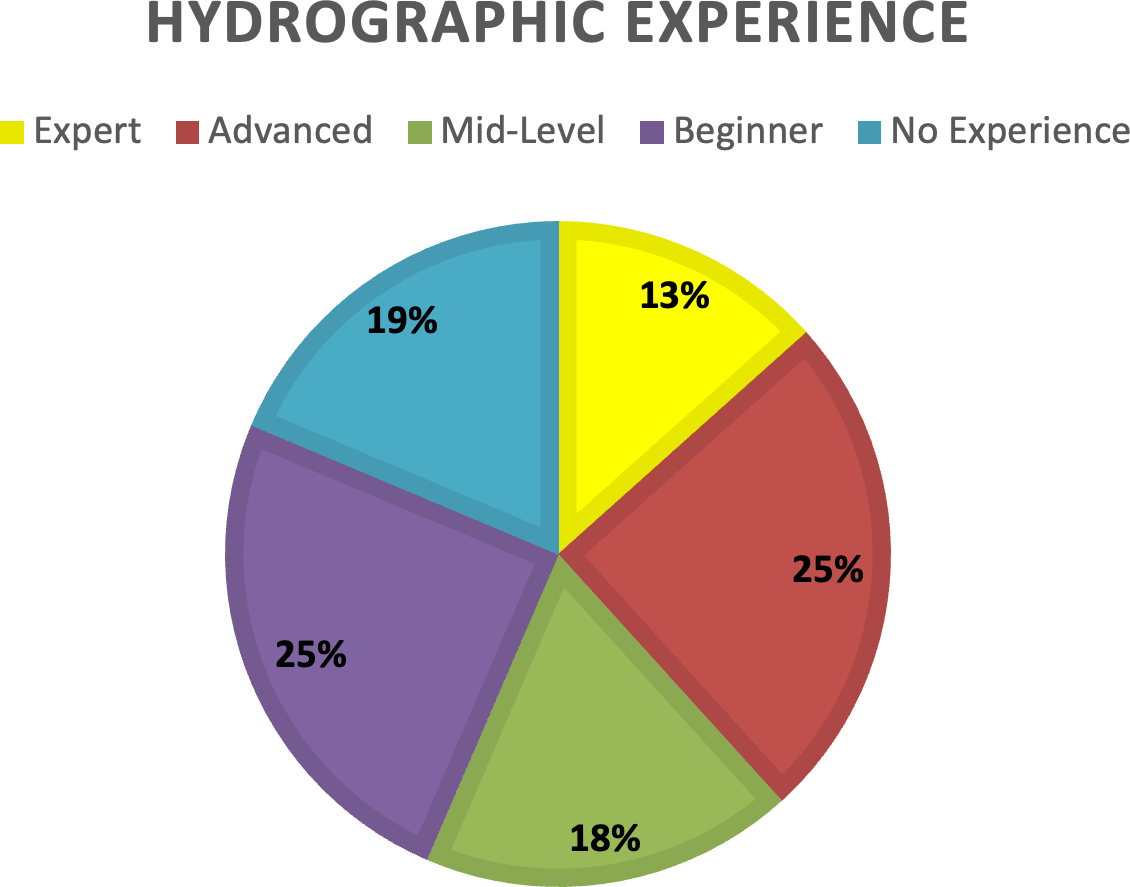
The pie chart titled “Hydrography Experience” represents the distribution of responses to five questions about different aspects of hydrography experience:
- How do you evaluate your experience with Single Beam Echosounder (SBES) bathymetric data acquisition?
- How do you evaluate your experience with SBES bathymetric data processing?
- How do you evaluate your experience with Multibeam Echosounder (MBES) bathymetric data acquisition?
- How do you evaluate your experience with MBES bathymetric data processing?
- How do you evaluate your experience with bathymetric data feature classification?
From this data, the most common experience levels are “Advanced” and “Beginner,” which account for 25 % of the respondents. “No Experience” is also significant, accounting for 19 % of the respondents. Mid-Level experience is held by 18 % of the respondents. The “Expert” level is the least common, with 13 % of respondents rating themselves as such.
This distribution indicates a diverse range of expertise among the respondents, with a notable portion having significant experience (Expert and Advanced combined account for 38 %) and another considerable portion with minimal to no experience (No Experience and Beginner combined account for 44 %).
4.1.2 Desktop interface experience
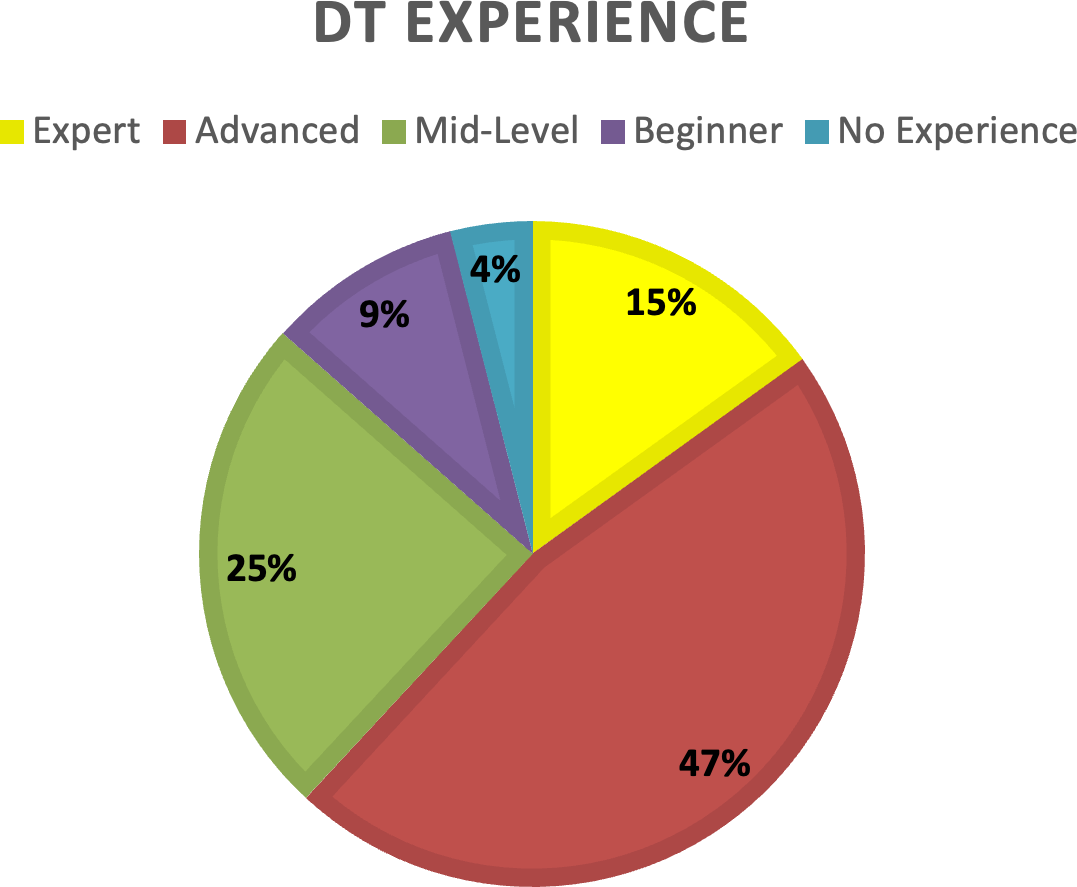
The pie chart titled “Desktop Interface Experience” represents the distribution of responses to three questions about experience with desktop interfaces:
- How do you evaluate your experience with desktop 3D data visualization?
- How do you evaluate your experience with 2D computer or console games?
- How do you evaluate your experience with 3D computer or console games?
This data shows that the most common experience level is “Advanced,” making up 47 % of the respondents. Mid-Level experience is also significant, accounting for 25 % of the respondents. The “Expert” level is held by 15 % of the respondents. The “Beginner” level is relatively low, with 9 % of respondents rating themselves as such. “No Experience” is the least common, with only 4 % of respondents. This distribution indicates that most respondents have significant experience with desktop interfaces (Advanced and Expert combined account for 62 %). A smaller portion has minimal to no experience (Beginner and No Experience combined account for 13 %).
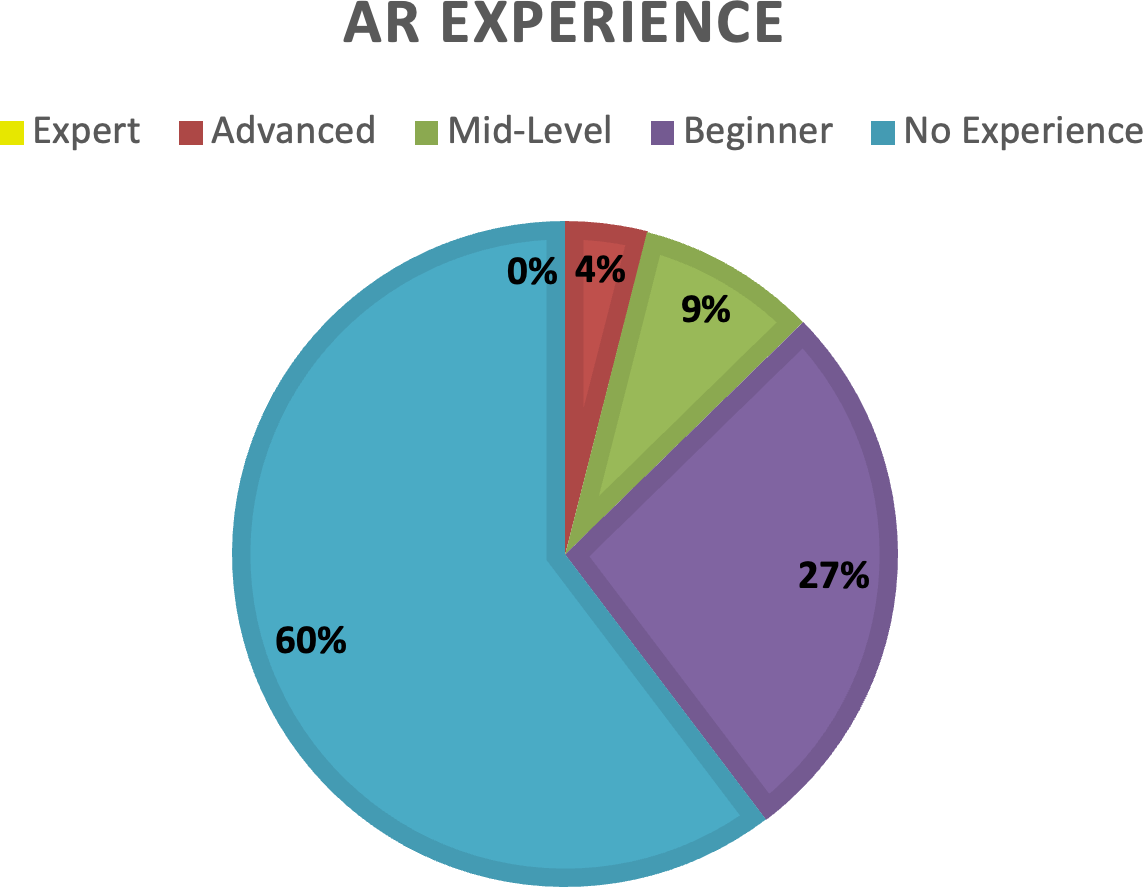
4.1.3 AR interface experience
The pie chart titled “AR Interface Experience” represents the distribution of responses to three questions about experience with augmented and virtual reality interfaces:
- How do you evaluate your experience with Augmented Reality (AR) 3D data visualization?
- How do you evaluate your experience with Virtual Reality (VR) data visualization?
- How do you evaluate your experience with AR games?
From this data, it can be observed that most respondents have no experience, accounting for 60 %. A significant portion of respondents are beginners, accounting for 27 %. Only 9 % of respondents have a mid-level experience. There are no respondents with advanced or expert-level experience. This distribution indicates that most respondents have little to no experience with AR and VR interfaces (No Experience and Beginner combined account for 87 %). Only a tiny fraction have mid-level experience, and no respondents have advanced or expert experience.
4.2 DT interface vs. AR interface: Task score
4.2.1 Description of the graphs
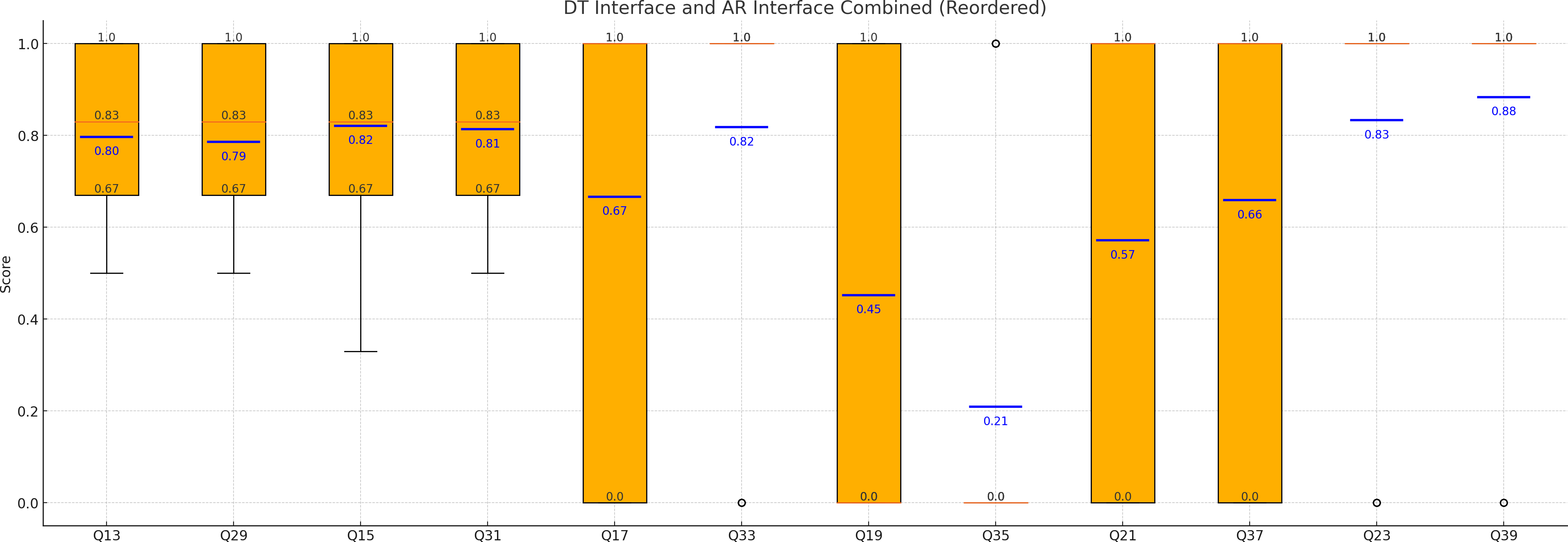
The box and whisker plots presented utilize a specific color code to represent different elements of the data:
- Orange Boxes: Represent the interquartile range (IQR) of the data, which is the range between the first and third quartiles. The box itself shows where the central 50 % of the data points lie.
- Red Horizontal Lines Inside the Box: Represents the median value of the data set. This line divides the box into two parts, indicating that half of the data points are above this value and half are below.
- Black Whiskers: These lines extend from the edges of the box to the minimum and maximum values within 1.5 times the IQR from the quartiles. They indicate the spread of the data outside the interquartile range.
- Blue Horizontal Lines: Represent the average (mean) values of the data sets. These lines provide an additional measure of central tendency, helping to compare the mean values across different questions.
- Grid Lines: The grid lines in the background help to visually align the data points for easier comparison across different questions.
This color code allows for clear and detailed visualization of the statistical properties of the data, making it easier to identify central tendencies, variability, and the overall distribution of response times for both DT and AR interface questions.
The box and whisker in the graph of Fig.9 are organized according to the corresponding task or question they represent, as indicated by their labels (e.g., Q13, Q29, Q15). Questions that refer to the same task are grouped accordingly – such as Q13 and Q29, which represent the same question presented in different interface conditions (e.g., desktop vs. AR). This arrangement allows for a direct visual comparison of participant performance or response values across equivalent tasks under different visualization modes. Consistent ordering makes interpreting variations in scores, medians, and confidence levels between interfaces easier.
4.2.2 Comparing questions 13 (Q13 – DT Interface) and 29 (Q29 – AR Interface) – Of the groups of colored points indicated, which do you consider spurious (select all that apply)?
The data for Q13 is centered around a high score, with most values ranging between 0.67 and 1.00. Similarly, the distribution of Q29 data closely mirrors that of Q13, with most values falling within the 0.67 to 1.00 range. Both Q13 and Q29 have an identical median value of 0.83, indicating the same central tendency for both datasets. The first and third quartiles for Q13 and Q29 are identical, demonstrating similar dispersion and range within the middle 50 % of the data. The average score for Q13 is 0.80, while Q29 has a slightly lower average of 0.79, suggesting a similar overall performance across both datasets. Both datasets exhibit a consistent range from 0.67 to 1.00 and lack any outliers, indicating stable scoring patterns without extreme variations.
The data for Q13 and Q29 are remarkably similar regarding central tendency, dispersion, and overall distribution. Both questions yield high scores concentrated around the same values, suggesting that respondents perceive the aspects consistently measured by Q13 and Q29. This similarity underscores the reliability and uniformity in responses to these questions.
The Neyman Confidence Intervals for Q13 and Q29 are similar, with Q29 having a slightly higher and more precise mean estimate. Both intervals overlap significantly, suggesting that the central tendencies of these datasets are very close to each other.
4.2.3 Comparing questions 15 (Q15 – DT Interface) and 31 (Q31 – AR Interface) – Of the groups of colored points indicated, which do you consider part of the sunken ship (select all that apply)?
The data for Q15 is concentrated around a high score, with most values ranging between 0.67 and 1.00, indicating a central tendency towards the upper end of the scoring scale. Similarly, the data for Q31 displays a comparable distribution, with scores predominantly falling within the same range and showing a central tendency towards higher values. Q15 and Q31 share an identical median value of 0.83, highlighting their similar central tendencies. The first and third quartiles for both questions are also the same, demonstrating comparable dispersion and range within the middle 50 % of the data. The average score for Q15 is 0.82, while for Q31, it is slightly lower at 0.81, indicating a similar overall performance in both datasets. Both datasets exhibit the same range from 0.50 to 1.00 and lack any outliers, reflecting consistent scoring patterns without extreme variations.
The data for Q15 and Q31 are strikingly similar in central tendency, dispersion, and overall distribution. Both questions have high scores concentrated around similar values, reflecting consistent responses. This consistency suggests that the respondents perceive the aspects measured by Q15 and Q31 similarly, underscoring the reliability and uniformity of their answers.
The Neyman Confidence Intervals for Q15 and Q31 have a similar central tendency, but Q15 suggests a slightly higher mean than Q31. The CI for Q31 is narrower, suggesting a more precise estimate of the mean for Q31 compared to Q15.
4.2.4 Comparing questions 17 (Q17 – DT Interface) and 33 (Q33 – AR Interface) – Which of the groups of colored points indicated is closest to the sea surface (shallowest depth), regardless of whether the data is spurious?
The data for Q17 exhibits a bimodal distribution, with scores concentrated at the lowest (0.00) and highest (1.00) values, suggesting a polarized perception among respondents. In contrast, the data for Q33 is highly skewed towards the highest score, with the majority of values being 1.00 and a few low scores, indicating a strong tendency towards the upper end of the scale. The first quartile for Q17 is at 0.00, and the third quartile is at 1.00, indicating wider dispersion and a bimodal nature. Conversely, Q33 has both quartiles at 1.00, showing no dispersion and a strong skew towards the highest score. The average score for Q17 is 0.66, whereas for Q33, it is higher at 0.82, indicating a more positive overall performance.
Both datasets share the same range from 0.00 to 1.00 and lack outliers. However, their distribution patterns differ, with Q17 being bimodal and Q33 strongly skewed towards the top. This comparison highlights the varying perceptions of the aspects measured by Q17 and Q33. Q17’s bimodal distribution suggests a divided perception among respondents, while Q33’s skew towards the highest score indicates more uniformly positive responses.
The Neyman Confidence Interval for Q33 suggests a higher and more precise mean than Q17. The intervals indicate a significant difference in the central tendencies of these datasets, with Q33 having a higher mean and a narrower confidence interval.
4.2.5 Comparing questions 19 (Q19 – DT Interface) and 35 (Q35 – AR Interface) – How many crane booms can you identify on the ship?
The data for Q19 exhibits a bimodal distribution, with scores concentrated at the lowest (0.00) and highest (1.00) values, indicating polarized responses among respondents. Conversely, the data for Q35 is highly skewed towards the lowest score, with the majority of values being 0.00 and a few high scores, suggesting a strong tendency towards the lower end of the scale.
Q19 has a median of 1.00, while Q35 has a median of 0.00, reflecting a central tendency towards the highest score for Q19 and the lowest score for Q35. The first quartile for Q19 is at 0.00, and the third quartile is at 1.00, indicating wide dispersion and a bimodal nature. In contrast, Q35 has both quartiles at 0.00, showing no dispersion and a strong skew toward the lowest score. The average score for Q19 is 0.59, whereas for Q35, it is significantly lower at 0.12, indicating a more positive overall performance for Q19.
Both datasets share the same range from 0.00 to 1.00 and lack any outliers, but their distribution patterns differ significantly. Q19 displays a bimodal distribution with significant scores at both extremes, suggesting polarized responses among respondents. In contrast, Q35 shows a strong skew towards the lowest score, indicating predominantly negative responses. This comparison highlights the differing perceptions of the aspects measured by Q19 and Q35, with Q19 receiving more balanced responses and Q35 indicating a tendency towards dissatisfaction.
The Neyman Confidence Interval for Q19 suggests a higher mean compared to Q35. There is no overlap between the intervals, indicating that the central tendencies of these datasets are significantly different, with Q19 having a higher mean and a slightly wider confidence interval.
4.2.6 Comparing questions 21 (Q21 – DT Interface) and 37 (Q37 – AR Interface) – How many masts can you identify on the ship?
The data for Q21 exhibits a bimodal distribution, with scores concentrated at the lowest (0.00) and highest (1.00) values, indicating polarized responses among respondents. Similarly, the data for Q37 shows a bimodal distribution with scores concentrated at both extremes, suggesting a divided perception among respondents. Q21 and Q37 have a median value of 1.00, reflecting a central tendency towards the highest score. Both questions’ first and third quartiles are 0.00 and 1.00, respectively, indicating wide dispersion and a bimodal nature. The average score for Q21 is 0.61, while for Q37, it is slightly higher at 0.66, suggesting a marginally more positive overall performance. Both datasets share the same range from 0.00 to 1.00 and lack any outliers, with similar distribution patterns. This comparison highlights the consistent nature of respondent perceptions for the aspects measured by Q21 and Q37.
The Neyman Confidence Interval for Q37 suggests a higher mean compared to Q21. There is some overlap between the intervals, indicating that the central tendencies of these datasets are similar. However, Q37 has a higher mean and a slightly narrower confidence interval than Q21.
4.2.7 Comparing questions 23 (Q23 – DT Interface) and 39 (Q39 – AR Interface) – How would you classify the type of shipwreck?
The data for Q23 is highly skewed towards the highest score, with the majority of values being 1.00, indicating a strong tendency towards the upper end of the scale. Similarly, the data for Q39 shows a strong skew towards the highest score, with most values at 1.00, reflecting a preference for the upper end of the scale. Q23 and Q39 have a median value of 1.00, indicating a central tendency towards the highest score. The first and third quartiles for both questions are 1.00, showing no dispersion and a strong skew toward the highest score. The average score for Q23 is 0.86, while for Q39, it is higher at 0.93, suggesting a slightly more positive overall performance. Both datasets share the same range from 0.00 to 1.00 and lack any outliers, but their distribution patterns are highly skewed towards the top. This comparison highlights the uniformity in respondent perceptions for the aspects measured by Q23 and Q39.
The Neyman Confidence Interval for Q39 suggests a higher and more precise mean than Q23. There is significant overlap between the intervals, indicating that the central tendencies of these datasets are pretty similar. Nonetheless, Q39 has a slightly higher mean and a narrower confidence interval than Q23.
4.3 DT interface vs. AR interface: Time-elapsed
This section presents a comparative analysis of time-elapsed statistics for two groups of questions: the DT Group (Q13, Q15, Q17, Q19, Q21, Q23) and the AR Group (Q29, Q31, Q33, Q35, Q37, Q39).
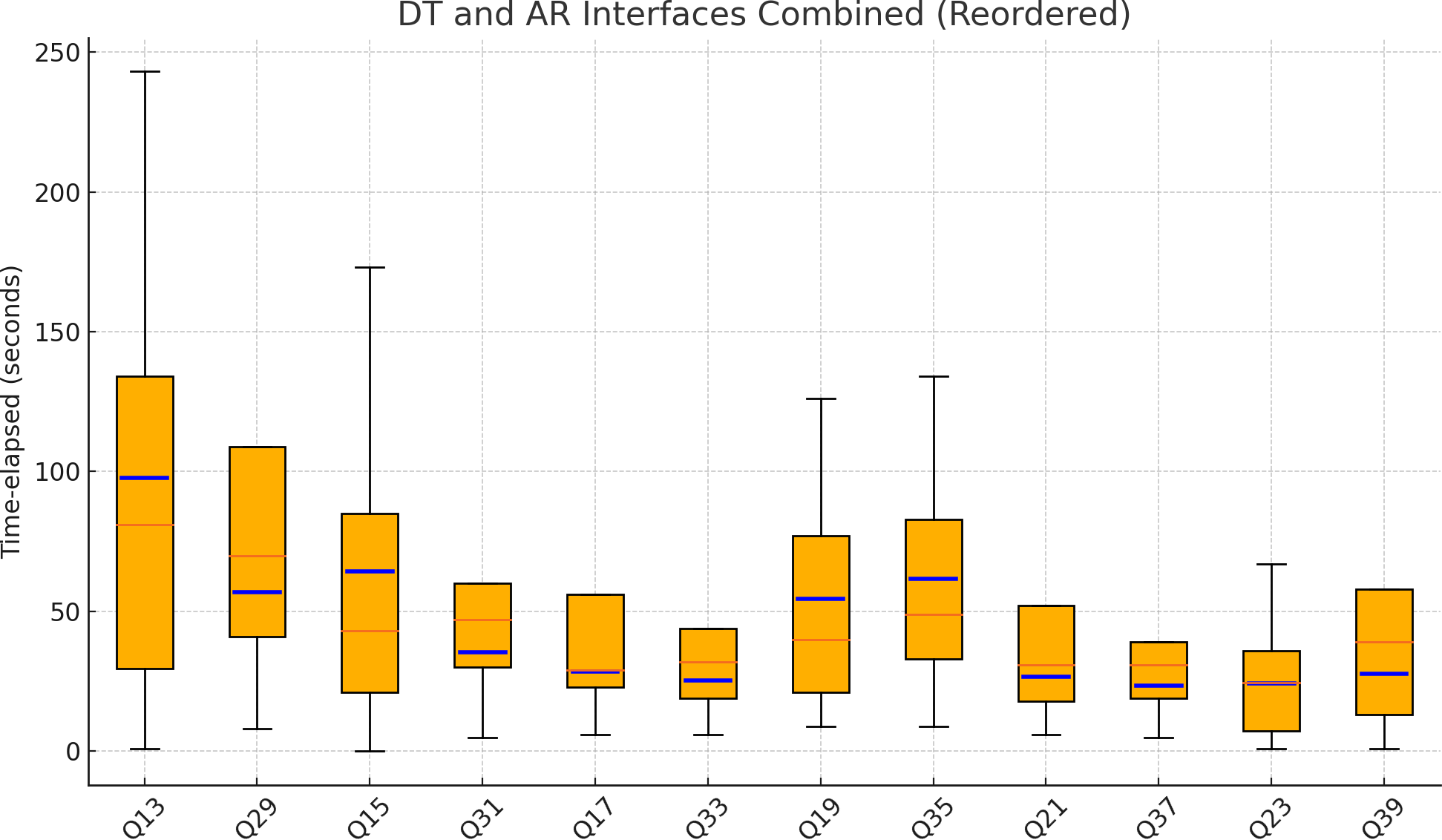
The DT Group’s time-elapsed statistics reveal considerable variability across different questions. For instance, Q13 exhibits a median time of 81.0 seconds, with an interquartile range (IQR) spanning 29.5 to 134.0 seconds and an average of 90.05 seconds. In contrast, Q23, after removing outliers, shows a median of 27.5 seconds, an IQR from 8.25 to 39.25 seconds, and an average of 46.12 seconds. Other questions in this group, such as Q15 and Q17, display medians ranging from 29.0 to 43.0 seconds, with averages between 39.69 and 57.31 seconds.
The AR Group exhibits a more consistent pattern in response times. For example, Q29 shows a median time of 70.0 seconds, with an IQR from 41.0 to 109.0 seconds and an average of 92.67 seconds. Similarly, Q31 and Q35 have medians of 47.0 and 49.0 seconds, respectively, with averages around 57.62 and 59.93 seconds. The ranges in this group, such as 8 to 317 seconds for Q29 and 1 to 259 seconds for Q39, indicate substantial variability but are generally more controlled than the DT Group.
The median time-elapsed for the DT Group tends to be higher in Q13 (81.0 seconds) and lower in other questions (27.5 to 43.0 seconds). In contrast, the AR Group exhibits a more consistent range of medians (31.0 to 70.0 seconds).
The DT Group shows broader IQRs for questions like Q13 (104.5 seconds) and Q15 (64.0 seconds), indicating greater variability. The AR Group has narrower IQRs, suggesting more consistent responses within each question.
The average time-elapsed is relatively similar between the groups. The DT Group’s Q13 (90.05 seconds) and the AR Group’s Q29 (92.67 seconds) have the highest averages. Other questions in both groups exhibit average times between 37.81 and 59.93 seconds.
The ranges in the DT Group are more extreme, particularly in Q13 (1 to 243 seconds) and Q23 (1 to 95 seconds without outliers). Although the AR Group also has wide ranges, such as 8 to 317 seconds for Q29 and 1 to 259 seconds for Q39, the variability is generally more controlled.
4.3.1 Time-elapsed – Neyman Confidence Intervals
Based on the provided statements and the analysis of the Neyman confidence intervals, here is a summary and critique for each comparison pair within the DT Group and AR Group:
The Neyman confidence intervals for Q13 and Q29 are similar, with both intervals overlapping substantially. This indicates that the time-elapsed data for both questions have similar central tendencies and variability, making them comparable.
Both Q15 and Q31 datasets exhibit similar means and variability, but Q15 (173) and Q31 (20) are significant outliers. Despite the similarities in distributions, the presence of these outliers highlights deviations from the central tendencies in both datasets.
The Neyman confidence intervals for Q17 and Q33 overlap, suggesting some similarity in their distributions. However, Q17 shows more variability compared to Q33. The individual times Q17 (42) and Q33 (22) are consistent with their respective datasets, as they fall within the confidence intervals.
The overlapping confidence intervals for Q19 and Q35 indicate some similarity in their distributions. However, Q35 shows slightly more variability compared to Q19. The individual times Q19 (10) and Q35 (115) are outliers, indicating significant deviations from the central tendencies.
The confidence intervals for Q21 and Q37 also overlap, suggesting similar distributions. However, Q37 shows more variability compared to Q21. The individual times Q21 (14) and Q37 (8) are outliers, indicating significant deviations from the central tendencies.
For Q23 and Q39, the overlapping confidence intervals indicate similarity in their central tendencies. However, the Q23 dataset shows much higher variability than the Q39 dataset. The individual time Q23 (29) is consistent with its dataset, while Q39 (67) is an outlier, highlighting the difference in the presence and impact of outliers.
The comparisons consistently show that datasets within both groups (DT and AR) have overlapping confidence intervals, indicating similar central tendencies. Variability differences are noted within each comparison, highlighting how some datasets exhibit a greater spread in the data.
4.4 DT interface vs. AR interface: Response confidence
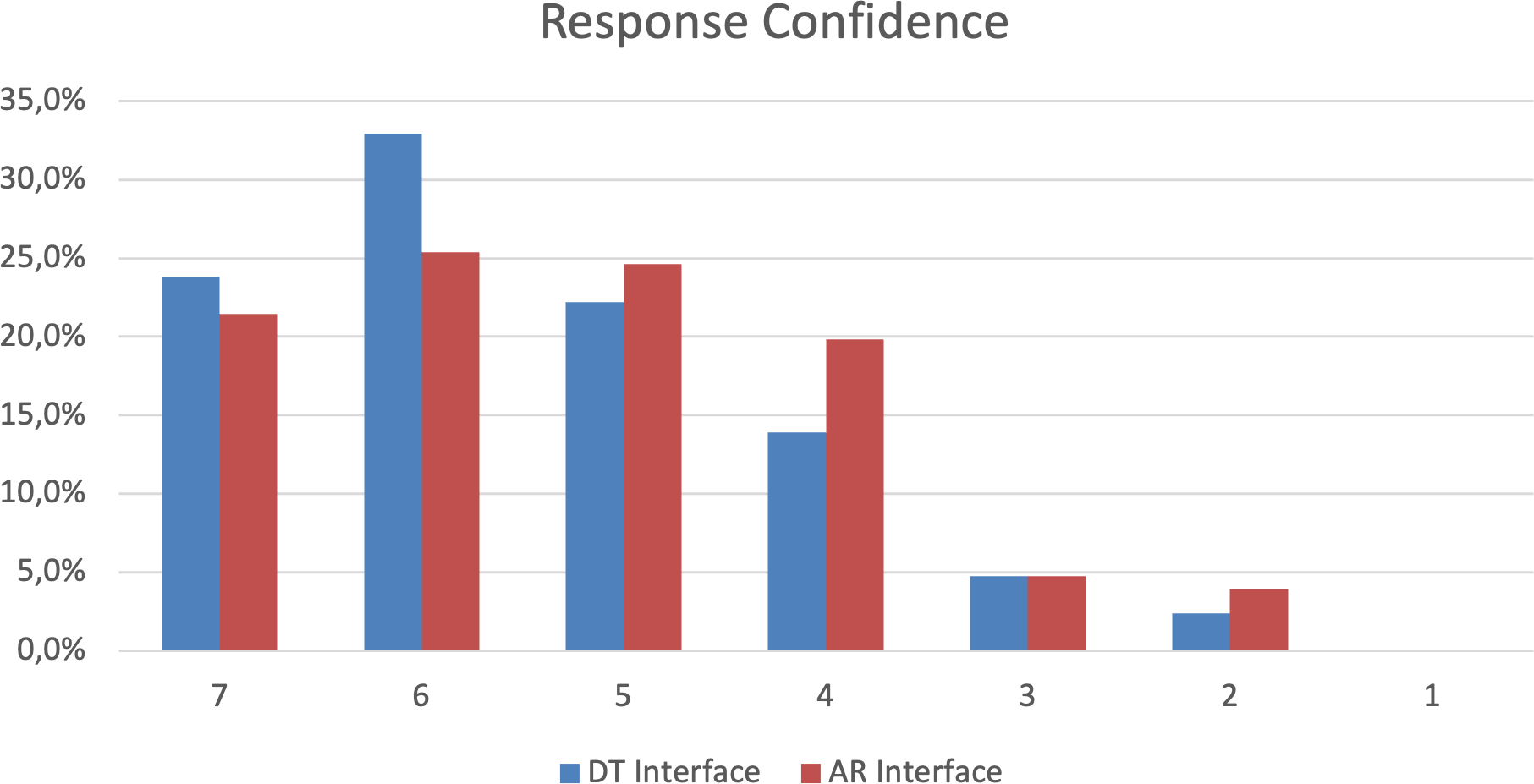
In both groups, the majority of participants reported high confidence levels. Group DT (Desktop Interface) showed higher confidence levels than Group AR (AR Interface). Conversely, Group AR reported higher medium confidence levels than Group DT. Both groups exhibited similar low confidence levels, with a slight increase in Group AR. This suggests that the Desktop interface may foster greater extreme confidence, while the AR interface tends to produce more medium confidence responses (Fig.11).
4.5 DT interface vs. AR interface: Post-survey
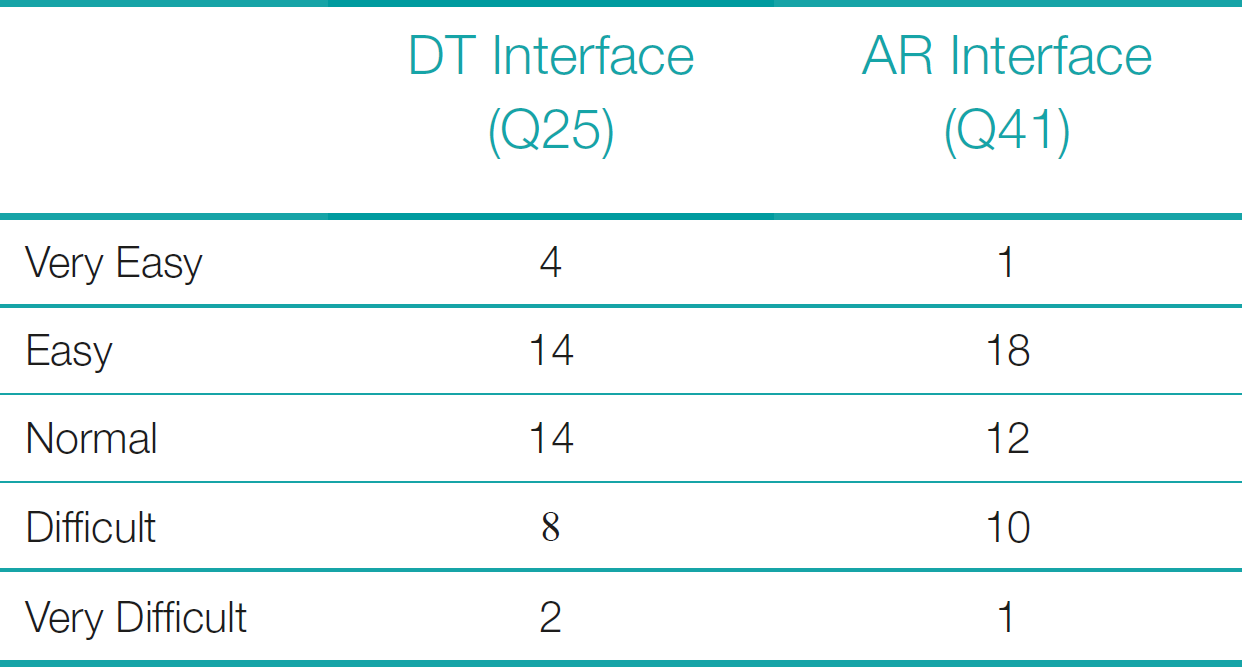
4.5.1 Rate your ease of perceiving the horizontal position of the selected points in raw MBES data using DT / AR data visualization interfaces
The DT interface received higher “Very Easy” ratings than the AR interface, indicating that more participants found the DT interface very easy to use. However, the “Easy” ratings favored the AR interface. Both interfaces were very close when combining “Easy” and “Very Easy” ratings, with a slight preference for AR.
The standard deviation for “Easy” and “Very Easy” ratings was higher, indicating more response variability. The average rating for “Easy” and “Very Easy” was almost identical between the DT and AR interfaces.
The “Normal” ratings were fairly close between the two interfaces, with a slight preference for DT. The “Difficult” ratings were slightly higher for the AR interface, and the “Very Difficult” ratings were very close, with a slight preference for DT. The combined “Difficult” and “Very Difficult” ratings were also close, with a slight preference for the AR interface.
Overall, participants rated the AR interface slightly higher for ease of use in the “Easy” and “Very Easy” and “Difficult” and “Very Difficult” categories. In contrast, the DT interface was preferred slightly more for “Normal” ratings.
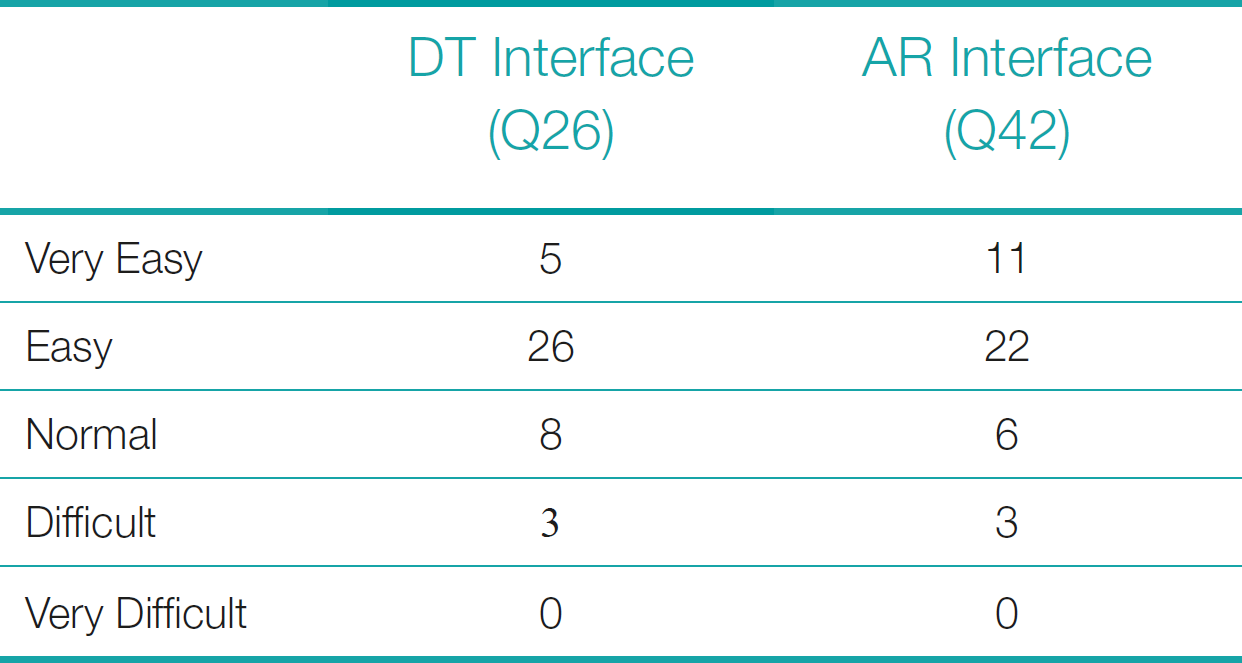
4.5.2 Rate your ease of perceiving the vertical position (depth) of the selected points in raw MBES data using DT / AR data visualization interfaces.
The AR interface’s “Easy” and “Very Easy” ratings are slightly higher than the DT interface’s. The DT interface’s “Normal” ratings are close but slightly favor the AR interface. The DT interface’s “Difficult” and “Very Difficult” ratings are identical.
The average rating for “Easy” and “Very Easy” is nearly identical, with a slight preference for AR, while “Normal” ratings show a slight preference for DT. The “Difficult” and “Very Difficult” ratings are the same for both interfaces. The standard deviation for “Easy” and “Very Easy” is low, indicating consistent responses. “Normal” ratings also show low variability, and “Difficult” and “Very Difficult” ratings have no variability since they are identical for both interfaces.
Overall, participants rated the AR interface slightly higher for ease of use in the “Easy” and “Very Easy” category. In contrast, the DT interface was somewhat preferred for “Normal” ratings, with no difference in the “Difficult” and “Very Difficult” category.
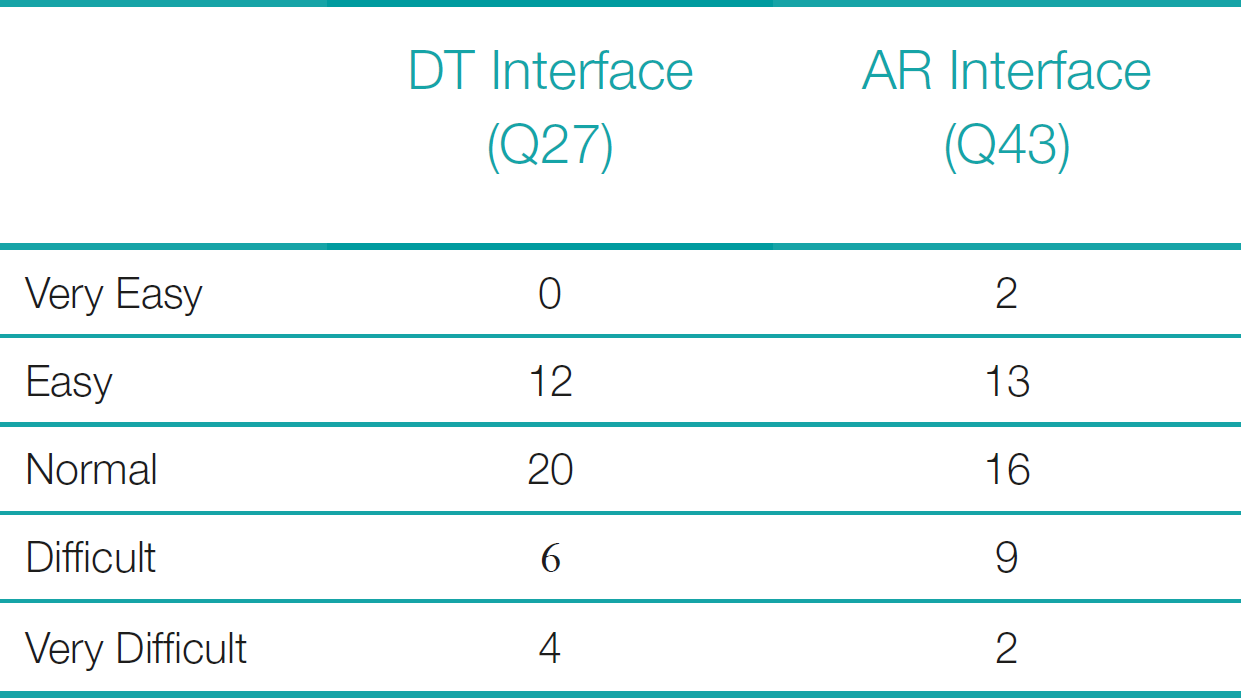
4.5.3 Rate your ease of identifying whether the selected points are considered spurious data in raw MBES data using AR / DT data visualization interfaces.
The AR interface’s “Easy” and “Very Easy” ratings are slightly higher than those of the DT interface, while the DT interface’s “Normal” ratings are higher than those of the AR interface. Similarly, the AR interface’s “Difficult” and “Very Difficult” ratings are slightly higher than the DT interface’s.
The average rating for “Easy” and “Very Easy” is higher for the AR interface, the “Normal” rating is higher for the DT interface, and the “Difficult” and “Very Difficult” ratings are higher for the AR interface. The standard deviation for “Easy” and “Very Easy” is relatively low, indicating consistent responses, while the “Normal” rating shows more variability. The “Difficult” and “Very Difficult” ratings have low variability.
Overall, participants rated the AR interface slightly higher for ease of use in the “Easy” and “Very Easy” and “Difficult” and “Very Difficult” categories. In contrast, the DT interface was preferred for “Normal” ratings.
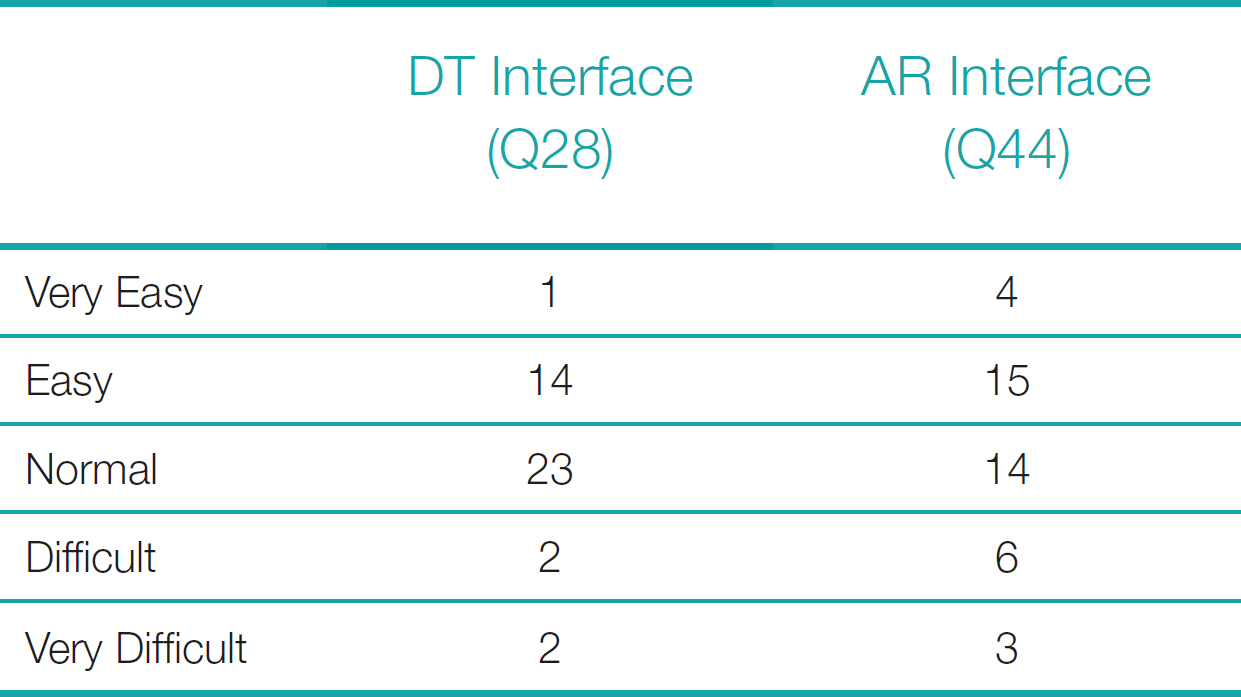
4.5.4 Rate your ease of identifying whether the selected points belong to the structure of the sunken ship in raw MBES data using AR / DT data visualization interfaces.
The AR interface has higher “Easy” and “Very Easy” ratings than the DT interface, while the DT interface has higher “Normal” ratings. The AR interface has higher “Difficult” and “Very Difficult” ratings.
The average rating for “Easy” and “Very Easy” is higher for the AR interface, the “Normal” rating is higher for the DT interface, and the “Difficult” and “Very Difficult” ratings are higher for the AR interface. The standard deviation for “Easy” and “Very Easy” is relatively low, indicating consistent responses, while the “Normal” rating shows more variability. The “Difficult” and “Very Difficult” ratings also have more variability, indicating a more comprehensive range of responses.
Overall, participants rated the AR interface higher for ease of use in the “Easy” and “Very Easy” and “Difficult” and “Very Difficult” categories. In contrast, the DT interface was preferred for “Normal” ratings.
Based on post-survey results, most participants rated tasks in the AR interface as either “Easy” and “Very Easy” or “Difficult” and “Very Difficult”. In contrast, tasks in the DT interface were predominantly rated as “Normal”.
4.6 Exit survey
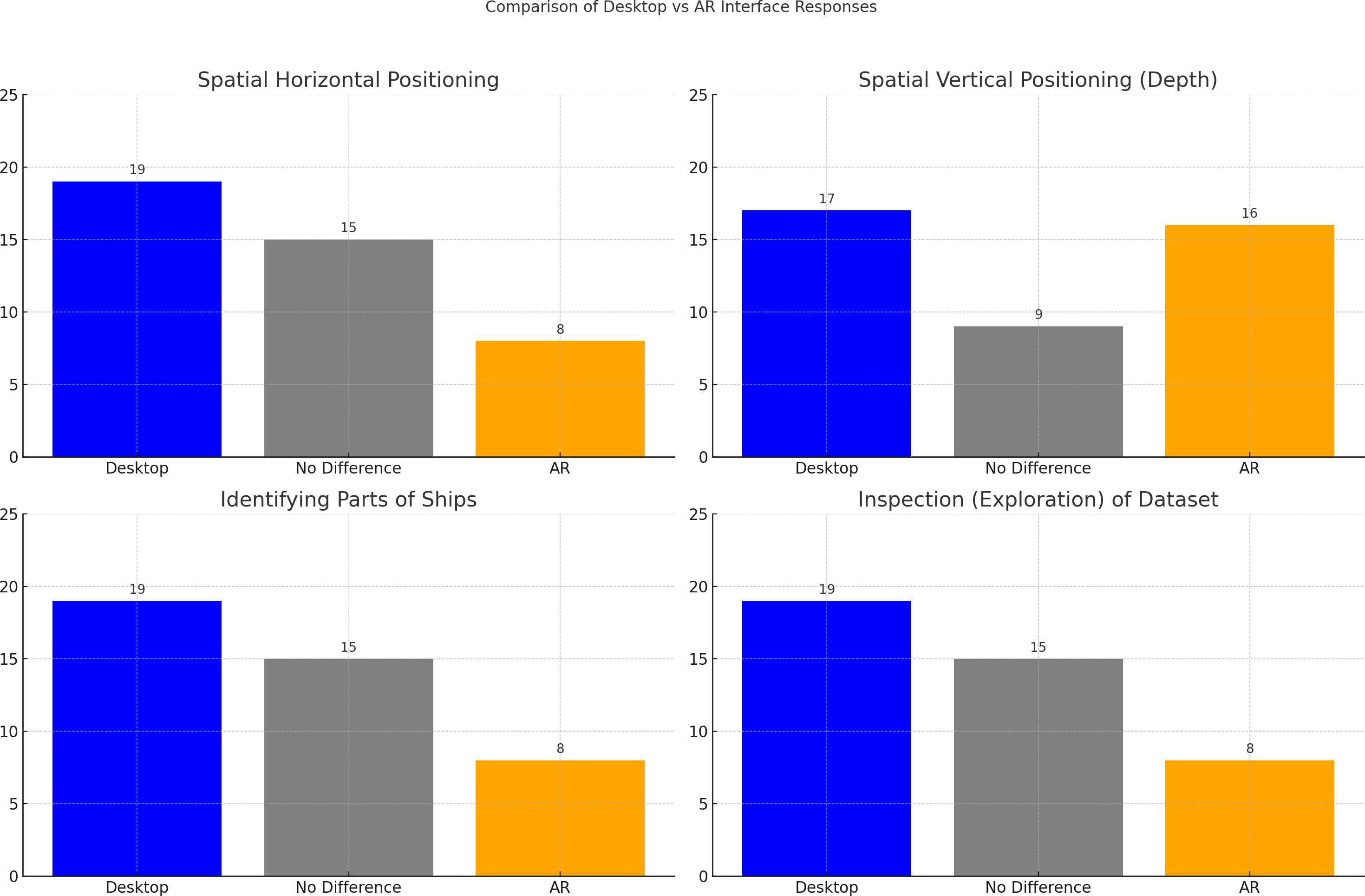
Based on exit-survey results, most participants preferred the desktop interface for spatial horizontal positioning, identifying parts of ships, and inspecting (exploring) the dataset, with fewer finding no difference and the least preferring the AR interface. However, for spatial vertical positioning (depth), preferences were similar between the desktop and AR interfaces, with a slight majority favoring the desktop (Fig.12).
4.6.1 AR bathymetric data visualization prototype usefulness
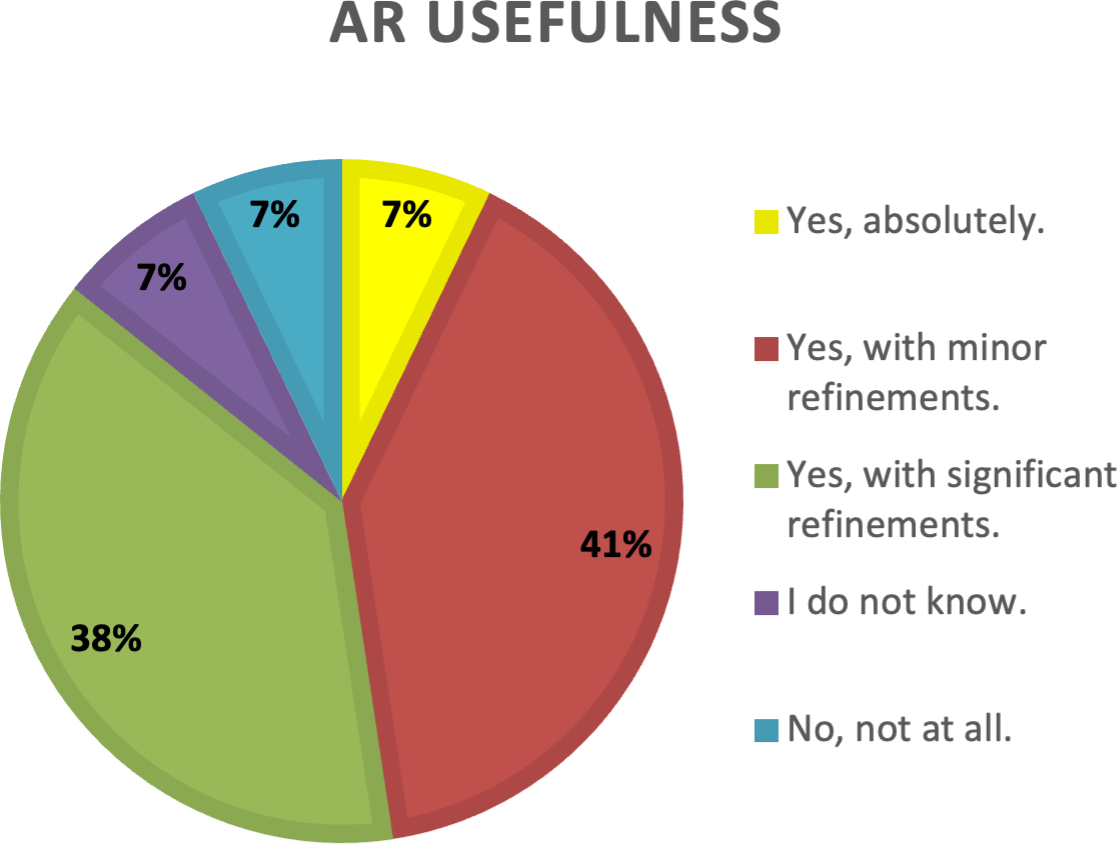
The results of the question asking the participants’ opinion about the usefulness of the AR bathymetric data visualization prototype used in the experiment in everyday hydrographic office workflow show that a significant majority (90 %) believe the prototype would be useful. However, 82.5 % think it requires refinements. Only a few (7.5 %) are unsure about the prototype’s usefulness. Another small portion (7.5 %) believes the prototype is useless (Fig.13).
4.6.2 Open-ended question: In your opinion, which affordances of the AR interfaces do you perceive to best support the hydrographic office’s data operations?
By the answers to the question, the volunteers indicate that, in their opinion, the affordances of AR interfaces that best support the hydrographic office’s data operations include the practicality of viewing data anywhere without needing to be at the collection site and the ease of sharing data instantly by uploading it to the cloud. AR provides a better definition of data discrimination, especially in vertical viewing, and offers freedom of action with familiar image manipulation for mobile users. It enhances simulation and training, improves visualization, and provides contextual information, making distinguishing and understanding features easier. The ability to manipulate the 3D model and the improved top view of the model are also notable benefits. AR supports spatial interaction and user mobility, allowing for better viewing angles and different locations outside the office. It facilitates group visualization and interaction, serves as an alternative tool for visualization and display of results, and enhances collaborative experiences—the anchoring on the surface aids in understanding vertical points and terrain behavior. AR interfaces offer greater mobility, making them useful anywhere, and can motivate data analysis by transforming tasks into interactive experiences and overlaying contextual information onto the user’s environment.
4.6.3 Open-ended question: In your opinion, which characteristics of AR-based data visualization do you perceive to undermine hydrographic data visualization or to be challenges that need to be overcome?
By the answers to the question, the volunteers indicate that, in their opinion, the challenges and characteristics of AR-based data visualization that may undermine hydrographic data visualization include the need for a specific environment with proper lighting to ensure clear viewing and the impact of ambient brightness and reflections. Users highlighted issues with the size and resolution of the points in point clouds and the limited ability to zoom in on parts of the object. Screen size is challenging, especially when mobile devices have low color contrast and reduced zoom capacity. Accessibility and maneuverability of devices and the longer time required to analyze data were also noted as concerns. The need for user training, familiarization with AR devices, and the infrastructure costs for acquiring and maintaining the technology were identified as significant barriers. Additionally, the dependency on a reference surface, the necessity to maintain environmental control, and the higher reliability and ease of data manipulation in desktop interfaces compared to AR were mentioned. Overall, the need for a specific physical space and environment, high costs, and adequate contrast and lighting are significant challenges that must be addressed to improve AR-based hydrographic data visualization.
4.6.4 Open-ended question: Is any other feedback would you like to share about these DT / AR interfaces in your workflow?
By the answers to the question, the volunteers indicate that, in their opinion, feedback on the DT/AR interfaces includes the need for options to change vertical exaggeration and axis presentation to identify the grid. While AR might not be practical for large volumes of work, it could benefit specific visualizations at data collection sites, mainly where desktop infrastructure is unavailable. Using a headset with AR devices was suggested for enhanced interaction. However, AR requires specific physical space, which may not align with the typical hydrographic office setup, making it more suitable for visualizing particular cases rather than everyday data analysis. There were calls for functionality to vary the size of cloud points, change scale, adjust color bands, and use larger screens or headsets for better visualization. AR’s 3D viewing capability made data interpretation more straightforward, and its potential for training and education was highlighted. It was also suggested that the tool be expanded to VR. Although the DT interface was favored for broad model viewing due to its higher resolution and dark background, AR was preferred for detailed viewing of small features. While adjustments are needed to make AR viable for hydrographic environments, it could significantly impact bathymetric data analysis and other hydrographic services.
4.7 Study’s limitations
This research presents several limitations that should be considered when interpreting the findings. First, as an intentionally exploratory study, the primary objective was to identify patterns and generate insights rather than to produce statistically generalizable results. The sample size was limited to the number of qualified personnel available at the Brazilian Navy Hydrographic Office. The study was conducted using only the materials and mobile devices available at the hydrographic office, reflecting a low-cost, practical approach but restricting the range of interface technologies and display configurations that could be tested. The AR prototype used was also an early-stage model, which may not reflect the usability or responsiveness of more mature commercial systems. Furthermore, time constraints required that each participant complete the tasks within a limited time window, potentially impacting the depth of exploration and the accuracy of responses. Lastly, the absence of standardized usability questionnaires, such as SUS (System Usability Scale), and the exclusive use of descriptive statistics limit the study’s capacity to offer stronger inferential conclusions. These aspects are important considerations for future research aiming to build upon this initial investigation.
5 Discussion
Beyond the quantitative findings, the qualitative feedback collected in this study provided valuable context for interpreting the observed differences between the AR and desktop interfaces. Participants’ reflections offered insights into how the tabletop AR interface influenced their spatial perception and task performance—core aspects of the study’s central hypothesis. Comments frequently highlighted the clarity of spatial relationships and the sense of immersion when using AR, suggesting potential advantages in perceiving depth and navigating complex structures. At the same time, participants noted challenges such as the novelty of the interface, the need for more familiarization time, and occasional discomfort or instability when handling the device. This feedback offered a nuanced understanding of how users experienced each interface, revealing factors that may affect usability and adoption in operational settings. By capturing user attitudes and contextual observations that quantitative measures alone cannot fully explain, the qualitative data enriched the overall analysis and pointed to important considerations for future interface development and research.
5.1 Background experience
Based on the distribution of experience levels in desktop interfaces, most volunteers participating in the experiment will likely possess significant proficiency and familiarity with desktop interfaces. Specifically, with 62 % of respondents identifying as either “Advanced” or “Expert”, it was reasonable to expect a high baseline level of performance and understanding of complex data visualization tasks among the volunteers. Likewise, low performance was expected when using the AR interface since most volunteers had little or no experience.
5.2 Tasks score
Due to the results of the scores, both the Desktop and Augmented Reality interfaces are perceived positively for visualizing and analyzing 3D Bathymetric data models, with high central tendencies towards the upper end of the scoring scale. The data collected in the background survey initially suggested that volunteers would have a high baseline level of performance and understanding of complex data visualization tasks. It was also expected that their performance would be lower when using the AR interface, given that most volunteers had little or no prior experience with it. However, the results partially contradicted these expectations, as the performances turned out to be similar across both conditions.
The AR interface, in particular, shows slightly higher average scores and less dispersion in several questions (Q29, Q31, Q33, Q37 and Q39), suggesting a marginally better overall performance when they need to perceive the horizontal or vertical position of the points, whether they are spurious data or not, including whether they are part of the ship’s structure. Together, these findings suggest that while both DT and AR interfaces are effective, the AR interface may offer a more consistent and enhanced user experience for specific tasks such as perceiving the spatial positioning of points, identifying spurious data, and distinguishing elements of the ship’s structure.
5.3 Tasks time-elapsed
In the analyses of time elapsed during tasks, the DT Group demonstrated higher variability and more extreme values in response times, particularly for questions like Q13 and Q15, questions that ask the volunteer to consider whether the colored points are spurious or part of the sunken ship. By contrast, the AR Group exhibits more consistent and narrower distributions, suggesting a more uniform user experience with AR interfaces. Again, contrary to what one might expect from performance, in terms of speed, both interfaces presented comparable duration times. The greater experience with the DT interface on the part of the volunteers did not translate into a shorter analysis time, just as the lesser experience with the AR interface did not translate into a more extended analysis time either.
The analysis uses Neyman confidence intervals to compare datasets within and between the DT and AR groups, highlighting distribution similarities and identifying significant outliers.
5.4 Post-survey and exit-survey
The desktop (DT) interface was generally preferred for spatial tasks, particularly horizontal positioning, identifying parts of ships, and dataset exploration. This preference indicates that participants found the desktop interface more reliable and manageable for these specific tasks, probably due to familiarity, or convention. However, the preference was well-balanced when considering vertical positioning.
The AR interface received polarized responses about the overall task difficulty ratings, with participants rating tasks as either “Easy” and “Very Easy” or “Difficult” and “Very Difficult”. This polarization may suggest that while some participants found the AR interface highly intuitive and efficient for specific tasks, others struggled significantly. On the other hand, the DT interface received predominantly “Normal” ratings, indicating a more consistent and moderate user experience.
Some possible explanations for why participants might rate AR and DT interfaces differently regarding ease of use, might include immersion, familiarity, learning curve, cognitive load, and user preferences.
5.4.1 Unpacking the potential benefits of AR and being mindful of subtleties
AR provides a more immersive and interactive experience, which could make perceiving points more straightforward and intuitive. One of the most powerful characteristics of AR is its ability to bring digital 3D objects, such as bathymetric data visualizations, into everyday spaces and robustly anchor them to physical surfaces using tracking, registration, and rendering. This spatial integration means that 3D data is no longer confined to a 2D display interface but can be seamlessly combined with the real-world workspace, particularly the hydrographic desk workspace. This integration leverages the importance of proprioceptive cues, which have been demonstrated to enhance geographic learning in the earliest examples of AR (Singh & Ahmad, 2024).
The significance of AR lies in its ability to combine virtual and real 3D spaces, providing perceptual benefits for users. By experiencing digital content within a real-world proprioceptive context, users of robust AR visualization systems can achieve higher “Easy” and “Very Easy” ratings, reflecting their opinions and reinforcing the intuitive nature of AR. This integration not only enhances productivity and data interpretation but also creates more interactive and immersive work experiences (Shelton & Hedley, 2002, 2004).
It is also worth commenting on the fact that AR visualization experiences can take several forms, and be achieved using a variety of spatial computing-enabled display devices. In this particular case, we used simple natural feature tracking via the Sketchfab application, which is made accessible by the use of a hand-held Android mobile device (smartphone). Using such a configuration allows the user to use a phone (or, for that matter, a tablet) function as a ‘lens’ through which the user may view the real world, ‘augmented’ with virtual content (in this case, the point clouds of the GB Church and HMCS MacKenzie). An alternative to this approach would be to use an AR-enabled head-mounted display. Such as a Meta Quest 3 with pass-through MR or pass-through AR. While the 3D virtual content (point cloud visualization) would stay the same, the user’s experience of it would be through the headset attached to their head. And, because the headset optically fills the user’s field of view (typically using a gasket around the ‘goggles’), the user’s only field of view is augmented. This contrasts an ‘AR lens’ metaphor using smartphones and tablets – where the user can see both AR views through the device, at the same time as the unmodified view of the real world all around. The head-mounted pass-through AR or MR approach may feel more elegant and integrated (and hands-free). At the same time, the AR lens approach may be more cost-effective and deployable by using everyday phones and tablets owned by users. The hand-held nature of the AR lens mode may also reinforce the proprioceptive function of the user experience by providing additional skeleto-muscular force-feedback that further calibrates the user’s spatial perception of visualizations based on vision and vestibular feedback. Quantifying the potential impact of different AR interface configurations on spatial perception and interpretation of the bathymetric datasets would be an interesting project to build upon the current work.
5.4.2 Familiarity with DT Interfaces
Background results showed that participants are more accustomed to DT interfaces for standard or routine tasks, which could explain their preference to rate the tasks as “Normal”. In other words, the familiarity and traditional use of DT interfaces might make them more comfortable with regular or less challenging tasks. On the other hand, background results showed that participants are less accustomed to AR, which could result in difficulties while handling the mobile device, resulting in higher ratings in the “Difficult” and “Very Difficult” category. This raises an interesting question for future work: Would the performance differ if participants had equal previous experience?
5.4.3 Learning curve and adaptability
The AR interface might have a steeper initial learning curve but offers superior ease of use once participants become accustomed to it, leading to higher ratings in the “Easy” and “Very Easy” categories. Participants also highlighted this issue that needs to be overcome to properly implement the interface in the routine activities of a hydrographic office.
The more familiar DT interface might have a lower learning curve but lacks AR’s advanced visualization capabilities, making it preferred for everyday tasks but less effective for both “Difficult” and “Very Difficult” tasks.
5.4.4 Visual and cognitive load
AR interfaces can reduce cognitive load by providing a more natural and intuitive visualization, making it easier to grasp simple and complex spatial relationships (Keller et al., 2021; Teng et al., 2023). This could explain higher ratings for both “Very Easy” and “Very Difficult” tasks. For tasks that are not too simple or too complex (i.e., everyday tasks), the DT interface might be seen as more efficient and straightforward, resulting in higher “Normal” ratings.
5.4.5 User preferences and biases
The novelty and innovative appeal of AR might bias participants to rate it higher for ease of use in both simple and complex scenarios. Conversely, some participants might be biased towards traditional DT task interfaces due to long-term usage and comfort.
5.4.6 Open-ended questions
The volunteers provided largely coherent answers to the open questions. Both responses highlighted the practicality and mobility of AR in hydrographic data operations and agreed on AR’s potential to enhance collaborative experiences. However, there were conflicting opinions. Some of the reasons for these differing views could be varying levels of prior experience with AR technology, differences in personal preferences for visualization methods, and the specific contexts in which individuals have used hydrographic data. Additionally, discrepancies in the perceived ease of use and the effectiveness of AR tools for particular tasks might have contributed to these differing opinions.
5.4.7 Different experiences and backgrounds and exposure to technology
According to the background survey results, although the volunteers are part of a selected group that includes hydrographers and Cartographic Engineers, they have, at some level, diverse professional experiences, educational backgrounds, and familiarity with 3D visualization technologies (Desktop and AR). These factors all influence their perceptions and opinions. For example, those with more AR experience were more aware of its benefits and limitations, such as the need for specific environmental conditions or high costs. For instance, in the first answer, some volunteers emphasize the ability to view and interact with data using AR interfaces in various environments. In contrast, some highlighted in the second answer the necessity for specific environments, such as the need for proper lighting and controlled environments for effective AR visualization, noting that AR’s mobility and flexibility come with certain environmental constraints.
Likewise, those who have used DT interfaces extensively may have different insights than those new to it. Experienced users might appreciate the practical benefits more, while novices might focus on the challenges and learning curve (Unwin, 2020).
5.4.8 Specific roles and responsibilities and perceived value and impact
As the recruitment process did not restrict the organization’s rank or function for survey participants, volunteers probably included personnel from different ranks (it is impossible to be sure due to the anonymized aspect of the survey). Their specific organizational roles can shape an individual’s opinions (Hewes, 2019). For instance, a data analyst might focus on AR’s technical challenges, while a manager might emphasize its strategic benefits for operations.
Likewise, individuals might perceive the value and impact of AR differently based on how directly it affects their work. Those who see immediate benefits in efficiency and visualization might be more favorable, whereas those who encounter obstacles might be more critical.
5.4.9 Personal preferences, comfort levels, bias, and subjectivity
Individual comfort levels with new technology can vary. Some might find AR interfaces intuitive and easy to use, while others might struggle with transitioning from traditional methods. For example, the second text suggests that desktop interfaces offer higher reliability and ease of data manipulation than AR. Also, personal biases and subjective preferences can shape how individuals perceive the advantages and disadvantages of AR technology. These biases can be based on previous experiences with similar technologies or general attitudes toward technological innovation. For example, the first answer highlighted familiar image manipulation and ease of use for mobile users. In contrast, the second answer emphasized the need for user training and familiarization with AR devices.
5.4.10 Users value AR differentially
People may value or prioritize aspects of AR technology differently. Some might focus on its potential for improving data visualization and collaboration, while others might concentrate on technical challenges and usability issues. For example, both answers discuss the impact of AR on data visualization and interaction. The first answer mentions AR facilitating group visualization and interaction, emphasizing AR’s advantages in providing spatial interaction and contextual information. The second answer points out challenges related to screen size, resolution, and zoom capacity, which are critical to effective visualization.
In summary, while the desktop interface was preferred for specific spatial tasks due to its perceived reliability and ease of use, the AR interface elicited mixed reactions, suggesting it might offer significant benefits for some users while posing challenges for others. This could point to the AR interface’s potential for high usability in optimal conditions and highlight areas where user experience can be inconsistent and needs improvement.
5.4.11 Using experience empirical study of hydrographic AR, to inform the design of future AR-enabled hydrographic workspaces
Finally, and with an eye to future work also, some comments on the nature of the AR workspace. The AR ‘workspace’ background for our empirical work was a conventional tabletop desk space with a black cloth draped over it. This homogenous dark background was used to make the fine points of the point cloud perceivable (Figs. 4 and 5) and so that users were focused on the characteristics of the 3D point cloud in AR (and to avoid the potential for visual dissonance between real-world background and virtual AR overlays). We intentionally started with this basic configuration (plain background) since the present study was focused on basic task performance and specialized user audience reception and feedback rather than an investigation of visual dissonance (which will be engaged in future work).
Indirectly, the current study helps to raise a number of questions and opportunities for the future design of AR workspaces. Evolving from the homogenous dark workspace backgrounds to intentionally gridded workspace backdrops may offer to strengthen the proprioceptive function and depth cues and the potential to improve judgments of orientation, position, and dimensions of structures in 3D hydrographic point clouds. To this end, we have already begun developing prototypes of these workspaces (Fig. 14).
We believe a map table or workspace designed specifically for AR use, equipped with a gridded surface, could provide strong perceptual, spatial, and proprioceptive cues to support hydrographic interpretation. Future work to enhancing these aspects of the AR-enhanced hydrographic workspaces may aid users in accurately interpreting complex data, thereby improving overall performance and user satisfaction. This could lead to AR-enhanced hydrographic map tables in land-based facilities and in the command spaces of vessels. Future research will pursue this .
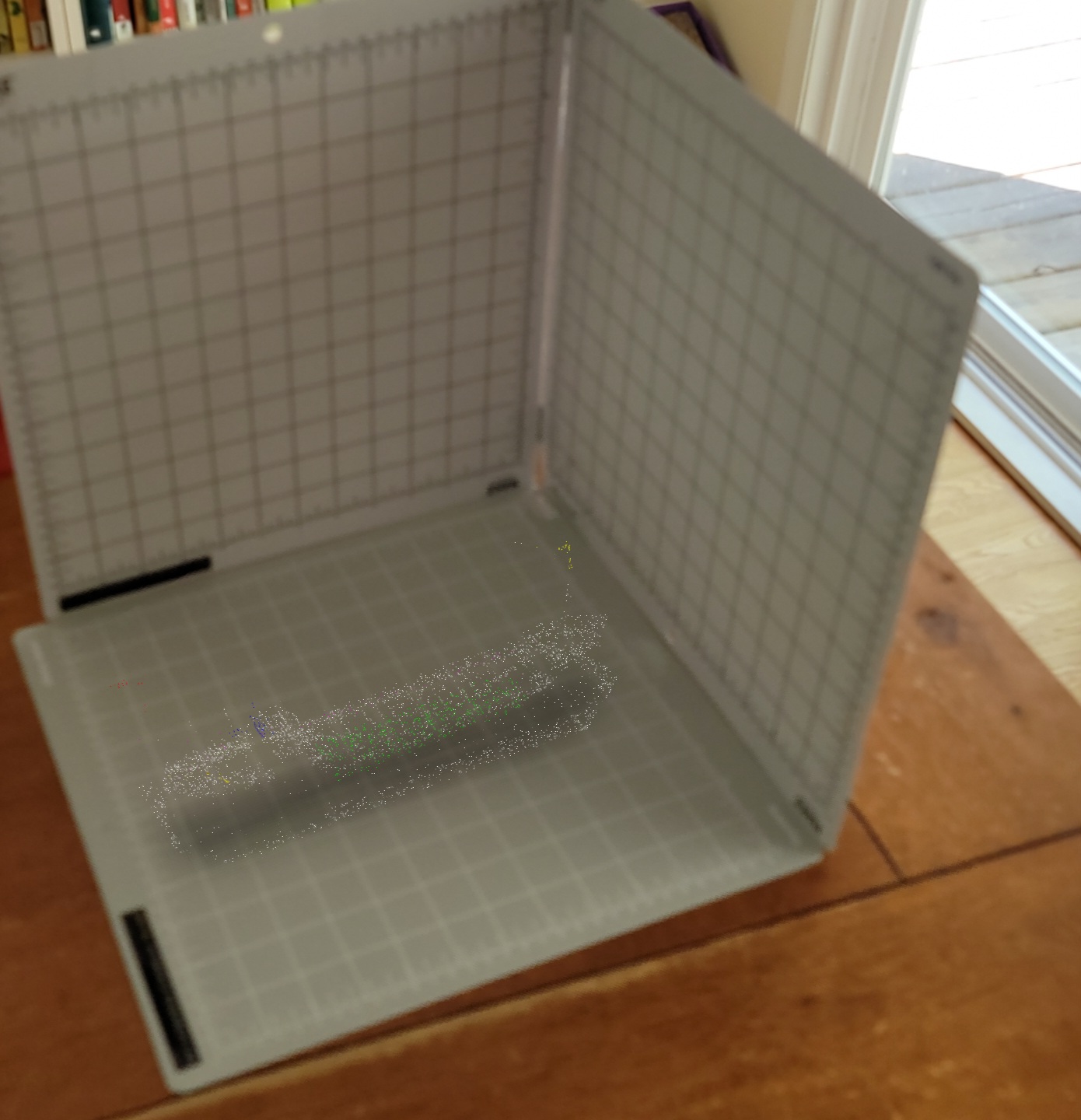
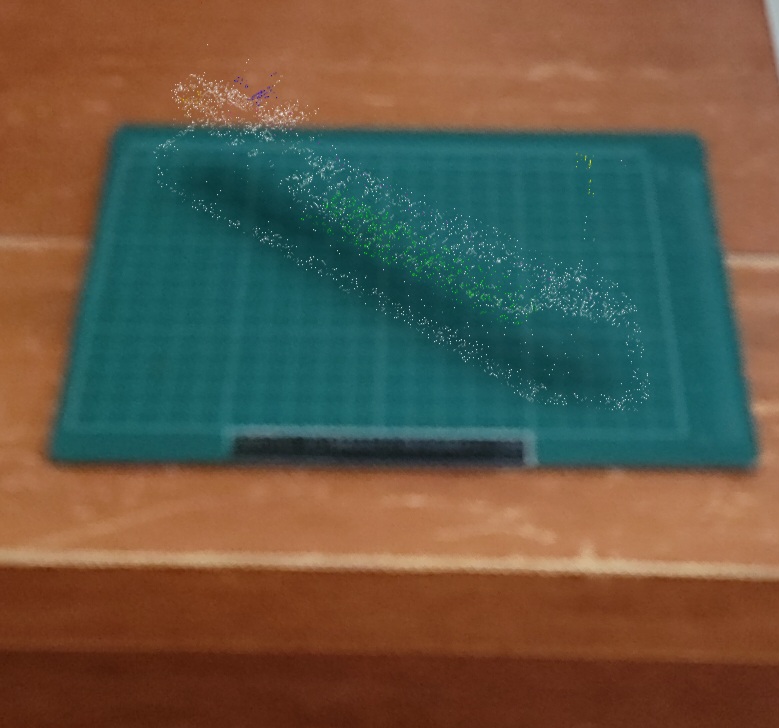
In summary, the desktop (DT) interface was generally preferred for its familiarity, ease of use, and reliability in routine spatial tasks – particularly those involving horizontal positioning, ship feature identification, and dataset exploration. Its lower learning curve and consistent performance made it effective for everyday hydrographic analysis. However, it lacked the immersive and spatially intuitive (proprioceptive) qualities of the AR interface. While less familiar to most participants, the tabletop AR interface showed potential advantages in spatial perception and depth understanding, especially in tasks requiring complex 3D interpretation. Participants using AR tended to show more consistent performance and slightly improved accuracy despite mixed perceptions of ease of use. Challenges associated with the AR interface included its novelty, device handling, and a steeper learning curve. Still, for tasks involving spatial complexity and immersion, AR appears to offer perceptual and proprioceptive benefits that desktop displays cannot easily replicate. These findings suggest that each interface brings distinct strengths and limitations, and their use may be best optimized according to task type, user experience level, and operational context.
6 Conclusion
In conclusion, this study has provided new, valuable insights into the comparative effectiveness of tabletop AR interfaces and conventional desktop computer monitors for hydrographic practitioners’ perception and interpretation of 3D bathymetric visualizations. Through a comprehensive two-phased experiment, we assessed participants’ performance across both interface types as they engaged in a series of perceptual and interpretive tasks using identical bathymetric datasets.
The findings indicate that while both interfaces support the visualization of 3D bathymetric data, the AR interface may offer advantages in terms of spatial perception and depth understanding. Participants using the AR interface demonstrated slightly improved accuracy and more uniform completion times, particularly in tasks requiring detailed spatial structure analysis and depth perception. This suggests that the ability of AR to combine 3D digital data visualizations with everyday spaces offers proprioceptively powerful user experiences that may enhance hydrographic data use and interpretation nature of AR, coupled with its ability of AR to provide an intuitive and engaging visualization environment, this may enhance the user’s ability to comprehend complex 3D spatial relationships.
Despite its widespread use and familiarity among practitioners, the desktop monitor was not more effective in facilitating an in-depth understanding of 3D bathymetric structures than an AR interface. Despite the limitations of the restricted field of view inherent to small mobile devices, the AR displays allowed participants to perform satisfactorily, highlighting the interface’s ability to overcome the challenges faced in accurately interpreting 3D data.
These results underscore the potential of tabletop AR interfaces as a tool for hydrographic analysis, offering a promising alternative to traditional desktop-based methods. By enabling a more natural and effective interaction with 3D visualizations, AR may enhance the analytical capabilities of hydrographic practitioners, leading to more precise and informed decision-making in maritime navigation, resource management, and environmental monitoring.
Future research should explore the integration of AR interfaces with other advanced visualization and interaction technologies and the long-term impacts of AR adoption on hydrographic practices. Further exploration of how to prepare everyday spaces to maximize the proprioceptive strengths of experiencing hydrographic data visualizations via AR, should be explored. This might lead to an ability to create standardized AR hydrographic data viewing bays like “hydrographic AR holodecks”. Finally, investigating user training and the development of standardized guidelines for AR interface design could further optimize the benefits observed in this study, ensuring broader and more effective application across the hydrographic community.
These findings align with emerging research in spatial interface technologies, which has shown that immersive environments such as AR and VR can enhance users’ spatial awareness and interpretation of complex 3D data. Studies in geospatial and environmental visualization (Çöltekin et al., 2020; Hedley, 2017) have similarly reported that AR-based systems can support a more intuitive understanding of spatial structures when compared to flat-screen displays. In hydrography and marine science, preliminary work has begun to explore mixed reality to improve data communication and situational awareness (Jonas, 2023; Araujo & Hedley, 2023). This study contributes to that growing body of research by offering empirical evidence from a professional context, reinforcing the value of AR as a practical and effective tool for hydrographic analysis.
References
Alexander, L., Brown, M., Greenslade, B., Pharaoh, A. (2023). Development of IHO S-100 – The new IHO geospatial standard for hydrographic data. The International Hydrographic Review, 29(1), pp. 164-169. https://doi.org/10.58440/ihr-29-a18
Araujo, A. A. and Hedley, N. (2023). Bathymetric data visualization – A review of current methods, practices and emerging interface opportunities. The International Hydrographic Review, 29(2), pp. 150–163. https://doi.org/10.58440/ihr-29-2-a29
Artificial Reef Society of British Columbia (2024). GB Church. https://artificialreefsocietybc.ca/g-b-church.html (last accessed 9 June 2024).
Artificial Reef Society of British Columbia (2024). Mackenzie. http://www.artificialreefsocietybc.ca/mackenzie.html (last accessed 9 June 2024).
Azuma, R. T. (1997). A Survey of Augmented Reality. Presence: Teleoperators and Virtual Environments, 6(4), pp. 355–385. https://doi.org/10.1162/pres.1997.6.4.355
Billinghurst, M., Clark, A. and Lee, G. (2015). A Survey of Augmented Reality. Foundations and Trends® in Human–Computer Interaction, 8(2–3), pp. 73–272. https://doi.org/10.1561/1100000049
Bleisch, S. (2012). 3d Geovisualization – Definition and Structures for the Assessment of Usefulness. ISPRS Annals of the Photogrammetry, Remote Sensing and Spatial Information Sciences, I–2, pp. 129–134. https://doi.org/10.5194/isprsannals-I-2-129-2012
Calder, B. R. and Mayer, L. A. (2003). Automatic processing of high-rate, high-density multibeam echosounder data: Multibeam Echosounder Data. Geochemistry, Geophysics, Geosystems, 4(6). https://doi.org/10.1029/2002GC000486
Carmigniani, J. et al. (2011). Augmented reality technologies, systems and applications. Multimedia Tools and Applications, 51(1), pp. 341–377. https://doi.org/10.1007/s11042-010-0660-6
Çöltekin, A. et al. (2020). Extended Reality in Spatial Sciences: A Review of Research Challenges and Future Directions. ISPRS International Journal of Geo-Information, 9(7), p. 439. https://doi.org/10.3390/ijgi9070439
Duan, J., Wan, X. and Luo, J. (2021). A review of universal hydrographic data model. Survey Review, 53(377), pp. 183–191.
Ferreira, I. O. et al. (2022). State of art of bathymetric surveys. Boletim de Ciências Geodésicas, 28(1), p. e2022002. https://doi.org/10.1590/s1982-21702022000100002
Few, S. (2024). Data Visualization for Human Perception. Interaction Design Foundation – IxDF. https://www.interaction-design.org/literature/book/the-encyclopedia-of-human-computer-interaction-2nd-ed/data-visualization-for-human-perception (last accessed 8 June 2024).
Gomes de Araujo, L. (2024) Potential of emerging tools and interfaces, like mixed reality, to improve the visualization and interpretation of multidimensional bathymetric data. M.Sc. thesis. Center for Coastal and Ocean Mapping, University of New Hampshire, Durham, NH. https://ccom.unh.edu/user/3048/publications (last accessed 30 March 2025).
Hedley, N. (2017). Augmented Reality. In D. Richardson et al. (Eds.), International Encyclopedia of Geography: People, the Earth, Environment and Technology. Oxford, UK: John Wiley & Sons, Ltd, pp. 1–13. https://doi.org/10.1002/9781118786352.wbieg0961
Hedley, N. and Lochhead, I. (2020). Turning 3D data surveys of intertidal zones into new modes of 3D visualization, simulation and spatial interface experiences. Int. Arch. Photogramm. Remote Sens. Spatial Inf. Sci., XLIII-B4-2020, pp. 791–794, https://doi.org/10.5194/isprs-archives-XLIII-B4-2020-791-2020
Hewes, R. P. and Patterson, A. M. (2019). Making the Shift from Technical Expert to Organizational Leader. American Management Association. https://www.amanet.org/articles/making-the-shift-from-technical-expert-to-organizational-leader/ (last accessed 12 June 2024).
Holland, M., Hoggarth, A. and Nicholson, J. (2016). Hydrographic processing considerations in the “Big Data” age: An overview of technology trends in ocean and coastal surveys. IOP Conference Series: Earth and Environmental Science, 34, p. 012016. https://doi.org/10.1088/1755-1315/34/1/012016
International Maritime Organization (IMO) (1974). International Convention for the Safety of Life At Sea, 1 November, 1184 UNTS 3. https://www.refworld.org/docid/46920bf32.html (last accessed 11 July 2023).
Jo, Y. et al. (2021). Ultrahigh-definition volumetric light field projection. Optics Letters, 46(17), p. 4212. https://doi.org/10.1364/OL.431156
Jonas, M. (2021). IHO’s Role in the Ocean Decade. Marine Technology Society Journal, 55(3), pp. 17–20.
Jonas, M. (2023). New horizons for hydrography. The International Hydrographic Review, 29(1), pp. 16–24. https://doi.org/10.58440/ihr-29-a01
Kastrisios, C. et al. (2023). Increasing Efficiency of Nautical Chart Production and Accessibility to Marine Environment Data through an Open-Science Compilation Workflow. ISPRS International Journal of Geo-Information, 12(3), p. 116. https://doi.org/10.3390/ijgi12030116
Keil, J. et al. (2021). Creating immersive virtual environments based on open geospatial data and game engines. KN-Journal of Cartography and Geographic Information, 71(1), pp. 53–65.
Kitamura, A. et al. (2014). Distribution of Attention in Augmented Reality: Comparison between Binocular and Monocular Presentation. IEICE Transactions on Electronics, E97.C(11), pp. 1081–1088. https://doi.org/10.1587/transele.E97.C.1081
Kitamura, A. et al. (2015). Comparison between Binocular and Monocular Augmented Reality Presentation in a Tracing Task. The Journal of the Institute of Image Information and Television Engineers, 69(10), pp. J292–J297. https://doi.org/10.3169/itej.69.J292
Langhorst, L. (2022). How to Choose the Right Hydrographic Processing Software: Key Considerations Before Investing. Hydro International, 22 March. https://www.hydro-international.com/content/article/how-to-choose-the-right-hydrographic-processing-software (last accessed 15 February 2023).
Le Deunf, J. et al. (2020). A Review of Data Cleaning Approaches in a Hydrographic Framework with a Focus on Bathymetric Multibeam Echosounder Datasets. Geosciences, 10(7), p. 254. https://doi.org/10.3390/geosciences10070254
Le Deunf, J. et al. (2023). Automating the Management of 300 Years of Ocean Mapping Effort in Order to Improve the Production of Nautical Cartography and Bathymetric Products: Shom’s Téthys Workflow. Geomatics, 3(1), pp. 239–249. https://doi.org/10.3390/geomatics3010013
Lekkerkerk, H.-J. (2018). Hydrographic Surveying: Where Do We Stand? Hydro International. https://www.hydro-international.com/content/article/hydrographic-surveying-where-do-we-stand (last accessed 22 February 2022).
Li, Z. et al. (2023). Exploring modern bathymetry: A comprehensive review of data acquisition devices, model accuracy, and interpolation techniques for enhanced underwater mapping. Frontiers in Marine Science, 10, p. 1178845. https://doi.org/10.3389/fmars.2023.1178845
Lochhead, I., Hedley, N. (2021). Designing Virtual Spaces for Immersive Visual Analytics. KN J. Cartogr. Geogr. Inf., 71, pp. 223–240. https://doi.org/10.1007/s42489-021-00087-y
Lütjens, M. et al. (2019). Virtual Reality in Cartography: Immersive 3D Visualization of the Arctic Clyde Inlet (Canada) Using Digital Elevation Models and Bathymetric Data. Multimodal Technologies and Interaction, 3(1), p. 9. https://doi.org/10.3390/mti3010009
Maia, P., Florentino, C. and Pimentel, V. (2017). Fluxo de dados hidrográficos para a produção de documentos náuticos.XXVII Congresso Brasileiro de Cartografia e XXVI Exposicarta, Rio de Janeiro-RJ, pp. 6–10. https://www.researchgate.net/publication/333678399 (last accessed 18 November 2022).
Masetti, G. et al. (2022). Effective Automated Procedures for Hydrographic Data Review. Geomatics, 2(3), pp. 338–354. https://doi.org/10.3390/geomatics2030019
Mayer, L. et al. (2018). The Nippon Foundation—GEBCO Seabed 2030 Project: The Quest to See the World’s Oceans Completely Mapped by 2030. Geosciences, 8(2), p. 63. https://doi.org/10.3390/geosciences8020063
Milgram, P., & Kishino, F. (1994). A taxonomy of mixed reality visual displays. IEICE TRANSACTIONS on Information and Systems, 77(12), pp. 1321–1329.
National Centers for Environmental Information (2024). Hydrographic Surveys and Data Collection. https://www.ngdc.noaa.gov (last accessed 8 June 2024).
National Oceanic and Atmospheric Administration (2024). Nautical Charts. https://www.nauticalcharts.noaa.gov (last accessed 8 June 2024).
Palmese, M. and Trucco, A. (2008). From 3-D Sonar Images to Augmented Reality Models for Objects Buried on the Seafloor. IEEE Transactions on Instrumentation and Measurement, 57(4), pp. 820–828. https://doi.org/10.1109/TIM.2007.913703
Pe’eri, S. and Dyer, N. (2018). Automated Depth Area Generation for Updating NOAA Nautical Charts. Hydro International, pp. 27–29.
Ponce, R. (2019). Multidimensional Marine Data: The next frontier for Hydrographic Offices. The International Hydrographic Review, 22. https://ihr.iho.int/articles/multidimensional-marine-data-the-next-frontier-for-hydrographic-offices/ (last accessed 30 March 2025).
Rokhsaritalemi, S., Sadeghi-Niaraki, A. and Choi, S.-M. (2020). A Review on Mixed Reality: Current Trends, Challenges and Prospects. Applied Sciences, 10(2), p. 636. https://doi.org/10.3390/app10020636
Shelton, B. E. and Hedley, N. R. (2002). Using augmented reality for teaching Earth-Sun relationships to undergraduate geography students. The First IEEE International Workshop Agumented Reality Toolkit,. First IEEE International Augmented Reality Toolkit Workshop, Darmstadt, Germany: IEEE, p. 8. https://doi.org/10.1109/ART.2002.1106948.
Shelton, B. E. and Hedley, N. R. (2004). Exploring a cognitive basis for learning spatial relationships with augmented reality. Technology, Instruction, Cognition and Learning, 1(4), p. 323.
Singh, G. and Ahmad, F. (2024). An interactive augmented reality framework to enhance the user experience and operational skills in electronics laboratories. Smart Learning Environments, 11(1), p. 5. https://doi.org/10.1186/s40561-023-00287-1
Smith Menandro, P. and Cardoso Bastos, A. (2020). Seabed Mapping: A Brief History from Meaningful Words. Geosciences, 10(7), p. 273. https://doi.org/10.3390/geosciences10070273
Speicher, M., Hall, B. D. and Nebeling, M. (2019). What is Mixed Reality? in Proceedings of the 2019 CHI Conference on Human Factors in Computing Systems. CHI ’19: CHI Conference on Human Factors in Computing Systems, Glasgow Scotland Uk: ACM, pp. 1–15. https://doi.org/10.1145/3290605.3300767
Teng, J. et al. (2023). Machine learning-based cognitive load prediction model for AR-HUD to improve OSH of professional drivers. Frontiers in Public Health, 11, p. 1195961. https://doi.org/10.3389/fpubh.2023.1195961
Turhan, B. and Gümüş, Z. H. (2022). A Brave New World: Virtual Reality and Augmented Reality in Systems Biology. Frontiers in Bioinformatics, 2, p. 873478. https://doi.org/10.3389/fbinf.2022.873478
Unwin, A. (2020). Why is Data Visualization Important? What is Important in Data Visualization? Harvard Data Science Review, 2(1). https://doi.org/10.1162/99608f92.8ae4d525.
Value Market Research (2021). Global Hydrographic Acquisition Software Market Report. https://www.valuemarketresearch.com/report/hydrographic-acquisition-software-market (last accessed 13 October 2022).
Van Krevelen, D. W. F. and Poelman, R. (2010). A Survey of Augmented Reality Technologies, Applications and Limitations. International Journal of Virtual Reality, 9(2), pp. 1–20. https://doi.org/10.20870/IJVR.2010.9.2.2767
Ward, R., Alexander, L., Greenslade, B. and Pharaoh, A. (2008). IHO S-100: The New Hydrographic Geospatial Standard for Marine Data and Information. Canadian Hydrographic Conference, 425. https://scholars.unh.edu/ccom/425 (last accessed 30 March 2025).
Wlodarczyk-Sielicka, M. and Blaszczak-Bak, W. (2020). Processing of Bathymetric Data: The Fusion of New Reduction Methods for Spatial Big Data. Sensors, 20(21), p. 6207. https://doi.org/10.3390/s20216207
Wölfl, A.-C. et al. (2019). Seafloor Mapping – The Challenge of a Truly Global Ocean Bathymetry. Frontiers in Marine Science, 6, p. 283. https://doi.org/10.3389/fmars.2019.00283
Authors’ biographies

Lieutenant Commander Andre A. Araujo holds a B.Sc. in Naval Science from Brazilian Naval College (Brazil) and a graduate diploma in hydrography completed at the Directorate of Hydrography and Navigation DHN (Brazil), recognized as an IHO/FIG/ICA Cat. An educational program. He is also a M.Sc. student of Geography at Simon Fraser University (SFU, Canada) with the research theme “Bathymetric data visualization using extended reality in applied hydrographic operations environments”. From 2015 to 2021, he worked for DHN (Brazil), where he gained most of his expertise in hydrographic surveying.

Dr. Nicholas Hedley is an Associate Professor of geovisualization and spatial interface research in the Department of Geography at Simon Fraser University, Canada. He is a multi-disciplinary spatial visualization and spatial interface designer/developer/applied scientist and also the founding director of the Spatial Interface Research Lab at SFU. His primary interests are in 3D/4D geographic visualization, spatial interface research, spatial reality capture, and applying these methods to challenging geographic phenomena. His work also involves designing 4D geovisual analysis and simulation, to facilitate powerful ways to characterize, visualize, experience, and interact with geographic data.