

Abstract
1 Introduction
There are, potentially, significant benefits to staging and processing hydrographic data using cloud computing resources (defined as: computation, storage, networking, and related compute infrastructure located in many geographic locations and owned and operated by a third party that sells access to this infrastructure for a particular period of time). Assuming that the data can be delivered to the cloud efficiently (a process that is becoming increasingly possible at reasonable cost with the advent of services such as Starlink1 and OneWeb2 with marine support), the cloud offers essentially infinite storage and processing capacity (limited primarily by ability to pay), and especially scalability of compute, with appropriately adapted algorithms. Applied appropriately, these characteristics could provide an alternative processing modality for high-density hydrographic data with potential benefits such as better data discovery, easier data management, and faster processing due to the inherently distributed and networked nature of cloud-based systems. Performance of data processing is still a fundamental problem for modern hydrography, and is limited by current desktop-focused software, especially in assuming a fixed hardware model, in contrast to the cloud.
The cloud is, however, a very different environment from traditional desktop computing, and has both different economics and attendant design trade-offs. For example, data ingress is typically free, but data egress is usually not, and therefore there is a significant driver for processing to follow the data into the cloud; the processing must then adapt to the distinctly different compute environment within the cloud if it is to be successful, efficient, or (ideally) both. (The cloud, for example, provides fine-tuned compute resources from a very wide palette of options, separation of compute from graphics and storage, virtual networks, and the option for resilience by design and massively parallel compute.) It is therefore not obvious that current generation non-distributed (i.e., running on a single workstation or server) desktop hydrographic data processing software is well adapted to the cloud, having been designed for a more conventional desktop computing environment with fast locally attached storage, integrated high-performance graphics resources, and exclusive control over data.
Getting data into the cloud is relatively simple, and well understood, and is therefore not treated here. One proposed means to process those data in the cloud is to take current generation hydrographic software and simply set up a “virtual PC” in the cloud (“Desktop in the Cloud”, DitC). Most cloud providers allow for either a managed virtual PC (e.g., in Amazon Web Services3 (AWS), WorkSpaces4) or a bare server which can be configured to the user’s preference (e.g., in AWS, an Elastic Cloud Compute5 (EC2) instance). A variety of storage systems can also be configured from object storage (e.g., AWS Simple Storage Service6, S3), to file-level storage (e.g., AWS Elastic File Store 7 (EFS) or FSx for Windows), or block-level storage (e.g., AWS Elastic Block Store8, EBS), along with a variety of more specialized systems such as Lustre (Schwan, 2003), a scalable, distributed, high performance file system, typically used for high-performance computing. There are therefore many different combinations of storage and compute that can be used to configure a DitC system, and the trade-offs can be distinctly different in the cloud than on the desktop, primarily because the resources are usually shared so that someone else’s use patterns can affect the performance that can be achieved.
We therefore propose here an experiment to gather real-world data for the performance of DitC systems using current generation hydrographic data processing software and cloud services. This focuses on the early-stage compute required for data processing, including data conversion, time-series processing (e.g., motion compensation, TPU estimation), and grid construction. Using AWS as a test base for convenience (all major cloud vendors have analogous compute, storage, and networking offerings), we detail two separate configurations of compute (one managed, one bare), and four different types of storage, using a real-world dataset from NOAA’s Ocean Exploration program for test. In addition, we consider an on-premises compute solution as a control, except that we use a rack-mount server and remote storage (in three different configurations) to match as well as possible the conditions in the cloud, and therefore attempt to illustrate the difference that control over resource contention (locally) provides to performance. In addition, these experiments allowed us to estimate total costs to process the test data, and therefore gain some insight into the economics of DitC processing.
2 Methods
Although many cloud providers exist, to reduce the complexity of comparison and without prejudice we select here Amazon Web Services (AWS) as the host platform for the experiments. In the following, all resources, compute and storage, were deployed in AWS Availability Zone9 us-east-2c to avoid cross-zone transfers (which can incur performance penalties and increase costs). The experiment conducted here consists of multiple replicates of a given set of computing tasks (Section 2.4) associated with hydrographic data processing, applied to a series of combinations of different compute resources (Section 2.1) and storage technologies (Section 2.2). The same dataset (Section 2.3) and processing software (Section 2.5) were used throughout. To mitigate caching effects, and for consistency, a standard procedure (Section 2.6) was used in each instance.
2.1 Compute resources
The broad classes of computation available are a hosted workstation (AWS WorkSpaces), and a fully configurable server (AWS EC2). In each case, a system with configuration typical for desktop processing workstations was selected, including a dedicated GPU, which was found to be required for the software used for processing. AWS accounts did not, at the time of the experiment, generally provide the ability to turn on GPU instances due to limited availability. A special request was made to allow for a single 8 vCPU instance with attached GPU to be turned on for these experiments. An on-premises control was established using a rack-mounted physical server. This provides a proxy to the cloud environment so that the comparison is closer than would be obtained through a true desktop machine. The details of the configurations are given in Table 1.
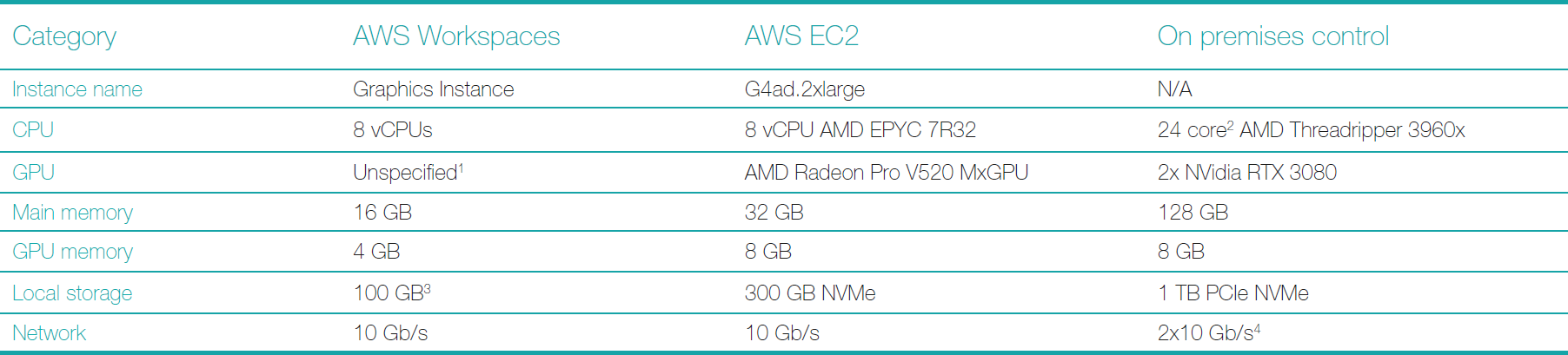
Notes to the table:
- The GPU being used is not specified in the AWS documentation, and may not be consistent.
- Each core supports two thread execution units.
- The WorkSpaces instance provides a 100 GB disc partition for the operating system, and a second 100 GB partition for data. The connection technology is not specified but is likely EBS.
- The two network interfaces are bonded for performance and are connected directly to the Storage Area Network (a NetApp FAS2650) in the same server room as the computer.
2.2 Storage resources
Cloud storage is available in at least four basic classes: object store (S3), file-level store (EFS, or FSx for Windows), block-level store (EBS), and locally attached storage (typically NVMe discs). Within these broad classes, there are often different service guarantees (e.g., guaranteed number of I/O operations per second, bandwidth, latency, etc.). For the experiment here, five cloud technologies were selected, and three on-premises configurations. Default parameters, where options were available, were used. On-premises storage was provided through a network connection to the Storage Area Network (SAN) controller10 in the same server room as the computer, on a dedicated network. Table 2 provides the details for the options by compute resource (not all storage types are available on each compute resource).
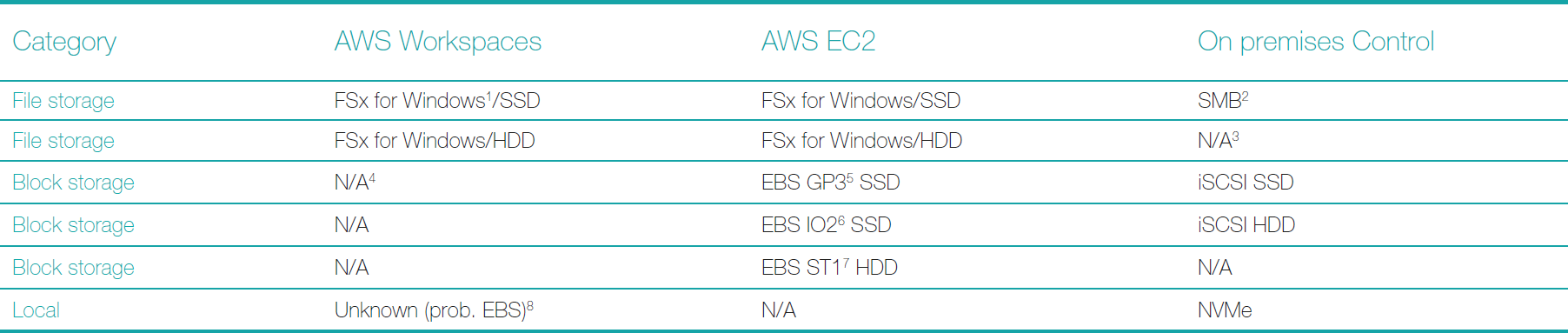
Notes to the table:
- FSx for Windows is a Windows-based file server providing file-level services for Windows clients using Microsoft-specific drivers and services (i.e., SMB). This is recommended by AWS for Windows clients over the EFS service (which uses NFS4 to serve the data).
- Server Message Block, a Microsoft protocol used for a number of purposes, including file sharing and data transport. This is supported natively by the SAN filer heads.
- The on-premises control environment does not use spinning hard disc drives for file-level storage.
- Block storage is not supported in WorkSpaces.
- EBS GP3 is a storage technology that is balanced between I/O performance and bandwidth.
- EBS IO2 is a storage technology that is biased towards I/O performance (i.e., a guaranteed number of operations per second).
- EBS ST1 is a legacy technology using spinning hard discs rather than solid-state discs; it is dramatically less expensive than SSD-based options.
- The connection technology is not clear; note (see 4 above) that user-supplied EBS volumes cannot be mounted in WorkSpaces.
2.3 Dataset
A dataset was provided by NOAA’s Ocean Exploration program, collected by the NOAA Ship Okeanos Explorer. EX2203 (Hoy et al., 2022), Fig. 1, was an early expedition in 2022 that contains data from shoreline to the Puerto Rico trench (approx. 6,500 m depth). For simplicity, 228 of the total 577 files were used to focus on the area around Puerto Rico, rather than the very long transit to the area. The total dataset is approximately 75 GB of Kongsberg Discovery KMALL files (Kongsberg, 2024). This data is publicly available through the NOAA National Centers for Environmental Information11 bathymetric data portal.

2.4 Computational tasks
Three primary compute tasks were used, simulating the early-stage non-interactive processing of multibeam echosounder (MBES) data. First, data in manufacturer’s format was converted into the processing software’s internal data format. To assess network and storage contention, three models of data layout were considered:
- “Read”. The source data is held on the indicated external storage media and written to the internal disc on the compute resource.
- “Write”. The source data is held on the internal disc on the compute resource and written to the indicated external storage media.
- “Roundtrip”. The source data is held on, and written to, the indicated external storage media.
Second, first-stage data processing was conducted. This typically includes all time-series adjustments and computations for the data, for example applying motion effects and static offsets (if not done by the sonar in real-time), adding corrected positioning information, computing uncertainties, etc. In each case, the manufacturer’s data was converted onto the indicated external storage, and the software’s project directory was placed alongside.
Finally, grid construction was conducted. To test the differences in data access patterns and computation load, two methods were used: a simple weighted average grid, and the CUBE data processing algorithm (Calder & Mayer, 2003). In all instances, the source data and product files were stored on the indicated external media. For the CUBE algorithm, the default configuration (“Deep”) in the processing software was used, except that the hypothesis resolution method was set to “Number of Soundings”, which should minimize computational load and storage access.
2.5 Software
Given availability and experience, but without prejudice, QPS Qimera12 was selected for processing (version 2.4.9). Although Qimera has a Linux version, the Windows binary was used since this is more typical in the desktop environment (Linux-based cloud resources are cheaper and might otherwise be preferred, see Section 4). The software was installed separately on each compute resource used and licensed through a stand-alone (virtual machine) license for the cloud resources, and via a license server in the on-premises environment. Care was taken throughout to ensure that the license was activated immediately before and deactivated immediately after each computation event, since shutting down a cloud compute resource and restarting it results in a different hardware configuration and invalidates the license (this difficulty is addressed in Section 4).
2.6 Experimental procedure
The Cartesian outer product of the compute resources, storage resources, and experiments in Sections 2.1, 2.2, and 2.3 result in a total of 68 configurations. Each configuration was tested ten times to provide some statistical basis for comparison. In each test, the processing log timestamps from Qimera were used to assess elapsed “wall clock” time for the process and were recorded to the nearest millisecond.
For each compute resource, a new installation of Qimera was used. For conversion, the test data were staged on the appropriate storage resource, and then converted into ten separate projects, to minimize cache effects.
For processing, the test data were copied to the storage resource to be used for processing and converted once into a blank Qimera project. Qimera was completely stopped to ensure that the project was closed, after which it was renamed “EX2203_Unprocessed”. This was subsequently copied ten times with distinct names (“EX2203_01” to “EX2203_10”). Each project was then processed in turn.
Finally, for grid construction, each of the ten processed projects was opened in Qimera, and all 228 source files were selected before creating a 150 m resolution Dynamic Grid using the weighted average algorithm with default parameters. A 150 m Dynamic Grid was then constructed using the CUBE algorithm as outlined in Section 2.3.
For each configuration, the arithmetic mean, standard deviation, median, and 95 % confidence interval (based on a Student’s t-statistic (Kendal et al., 1994, sec. 16.10) with υ = 9 degrees of freedom) were computed from the times recorded.
3 Results
The results of the data conversion experiment are shown in Fig. 2, color-coded by computational resource, and organized by storage resource on the horizontal axis. The results of the “read”, “write”, and “round-trip” experiments are shown to the left, center, and right of the storage resource marking on the horizontal axis. Vertical boxes around the mean indicate the 95 % CI (note that this reflects the variability of the timings only, since timings cannot be negative).
The results demonstrate that there are significant differences in performance between the computational technologies, with the EC2 instances generally faster than the WorkSpaces instances, with local performance better than either. The storage technology also has a statistically significant role in overall performance for a given computational resource with solid-state drives generally being better, often by a factor of 2–3. The “write” performance (i.e., reading the raw file from local store and writing to the indicated storage technology) is generally better than either “read” or “round-trip” performance, perhaps indicating a more aggressive caching policy on write within the cloud. Somewhat surprisingly, the “round-trip” performance (i.e., reading and writing to the same external storage technology) is not heavily penalized in these tests. Standard advice from the software manufacturer is not to write and read from the same disc due to bandwidth limitations; in the cloud, this appears not to be a significant concern. Finally, the on-premises storage performance seems to suggest some form of read caching, since there is a significantly longer run on the first experiment, which then resolves more quickly for subsequent runs. This is not observed in the cloud-based experiments, most likely because the shared nature of the resources means that cache contents are not preserved between runs.

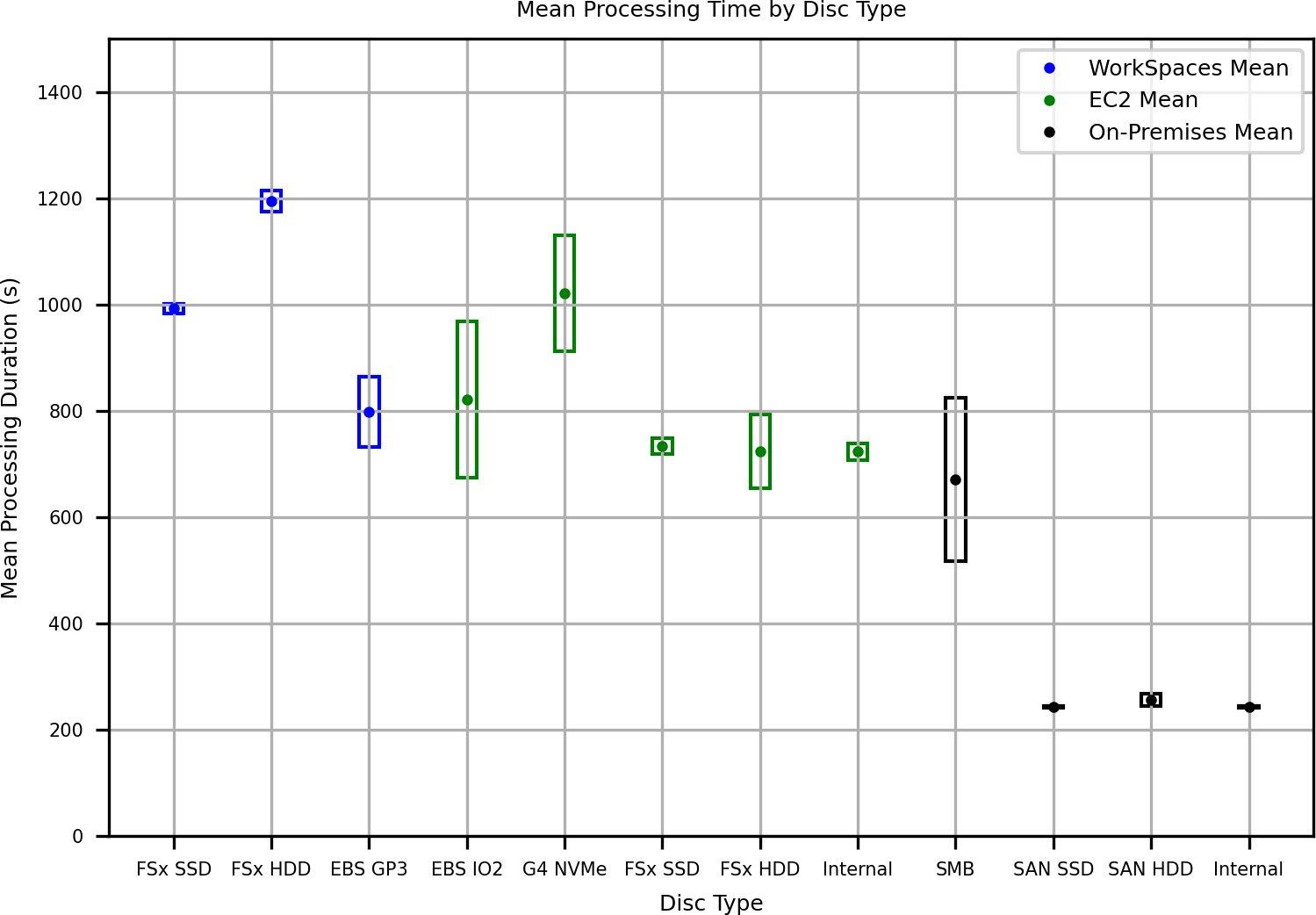
The results of the data processing experiment are shown in Fig. 3, color-coded by computational resource, and organized by storage resource on the horizontal axis. Vertical boxes around the mean indicate 95 % CI.
The general performance results are consistent with those of the data conversion step (Fig. 2), with the EC2 instance generally faster than the WorkSpaces instance, and the on-premises control faster than either. There is a performance penalty for spinning hard-disc storage for cloud-based systems (although not as much as for the data conversion task), but not for the on-premises system, and surprisingly the performance of all variants of EBS storage for EC2 show no consistent difference, suggesting that the usage pattern here does not match the “performance optimized” (IO2) EBS instance type, which is more expensive than the “general purpose” GP3 store; the similar performance of the “internal” (NVMe) disc on the EC2 instance suggests that it might also be implemented through an EBS mount. The on-premises performance, apart from when using SMB as the data transport, is much more consistent than cloud-based equivalents, most likely due to lower contention for the bandwidth and storage compute available on the local SAN. The SMB transport for on-premises compute is backed by the same SAN arrays and storage processors but is anomalous in performance. This is most likely due to poor interactions between the data access patterns from Qimera for this operation and the transport fabric (e.g., many small files are being accessed, so the overhead in negotiation for initial access overwhelms the protocol). This behavior also likely explains the relatively poorer performance in FSx storage in the cloud, which uses the same transport.
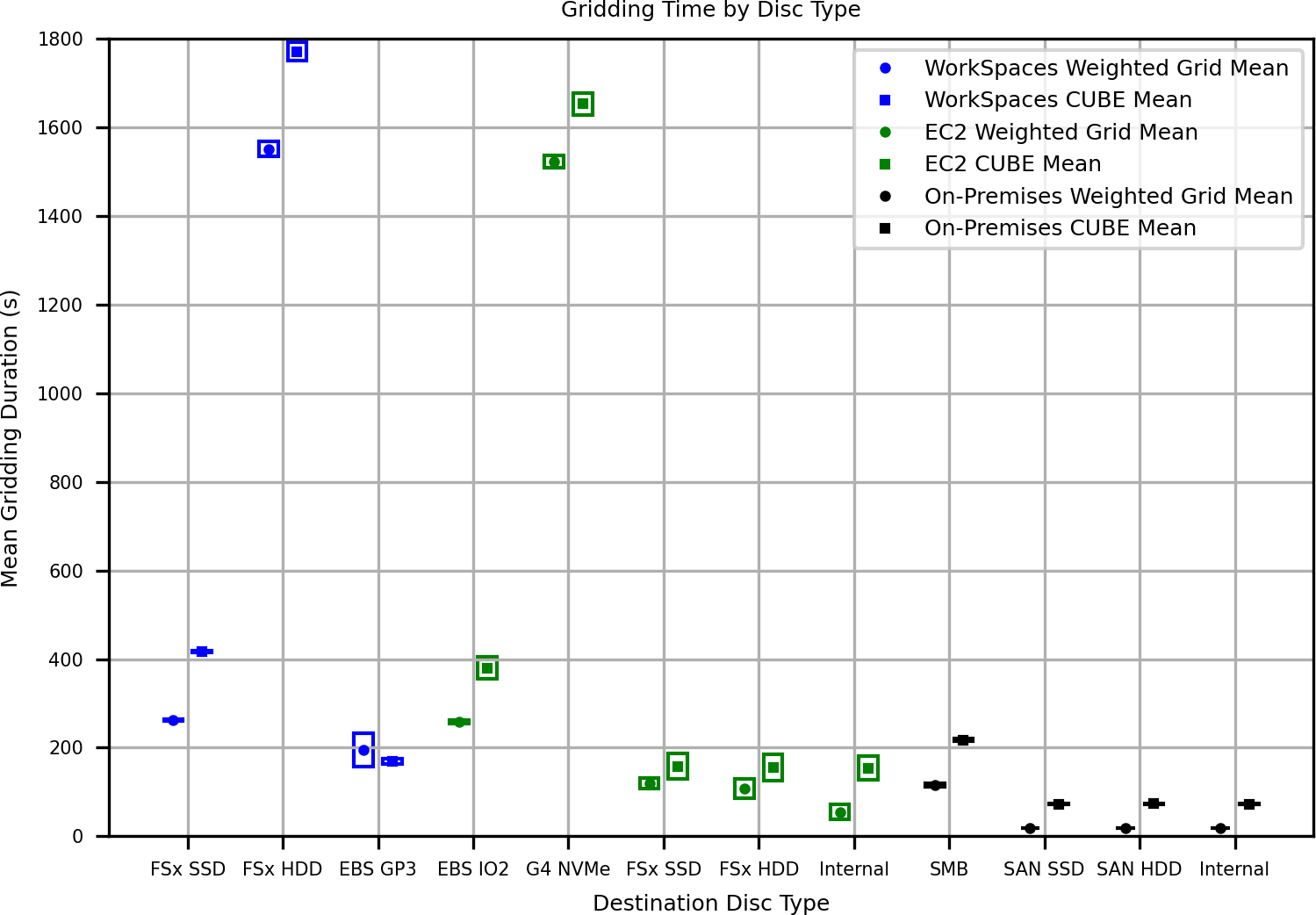
The results of the gridding comparison are shown in Fig. 4, color-coded by computational resource, and organized by storage resource on the horizontal axis. The results of the weighted average and CUBE processing are arranged to the left and right, respectively of the vertical mark for each storage resource. Vertical boxes around the mean indicate 95 % CI.
The results clearly indicate the performance penalty for mechanical (i.e., spinning hard-disc) storage, with performance approximately 4–5 times slower than for the solid-state storage on the same transport, dominating the compute costs. Since grid computation is something that is done frequently in many modern hydrographic data processing workflows, this is a significant concern for practical performance of the overall system. There is also a small performance effect by cloud compute resource, with the EC2 instance generally faster than the WorkSpaces; the on-premises performance is, however, significantly better (in the statistical sense), and much more consistent, likely due to lower resource contention. Finally, there is a clear performance penalty for use of SMB network filesystem both on-premises and in the cloud (i.e., using FSx-mounted storage). There is a trade-off between performance and ease of data management (e.g., to allow data to be shared between multiple simultaneous users) when considering the difference between SMB and EBS resources, to which we return in Section 4.
4 Discussion
The results here clearly demonstrate that there is a statistically significant difference in performance for desktop processing systems deployed in the cloud as a function of the compute resource used and the storage technology attached. In some cases, the difference can be of order 4–5 times slower. There are clear winners and losers. Spinning-disc storage, for example, generally induces a performance penalty, while EC2 compute instances have generally better performance for most compute tasks, potentially because it is possible to attached better (EBS) storage compared to the SMB-based storage used by WorkSpaces virtual desktop environments. The choice between solid-state storage technologies is less clear and may be due more to the transport fabric than the technology. For example, the different types of optimizations applied to EBS storage (e.g., general purpose GP3 relative to I/O optimized IO2) appear to have little influence on performance, but there is a statistically significant performance difference between the use of EBS storage (typically using something like iSCSI transport) and a managed service such as FSx for Windows (a Windows-based file server using SMB as transport).
There is a practical benefit to a file-based store (e.g., EFS or FSx for Windows), however, in that it can be simultaneously shared between users, while block-based store (e.g., EBS) can only be mounted to a single compute resource at any one time (although it can be moved between uses). For data management purposes, then, it might be beneficial to use FSx as primary storage, although the question of whether the continual performance penalty is an acceptable trade-off will be implementation dependent. (Note that the use of FSx here is nominally equivalent to a Windows file server holding data in a local network and sharing it to desktop workstations, a common hydrographic data processing practice. Although not covered by these results, it is likely that similar levels of performance penalty would be observed in this configuration.)
Although the results here argue against DitC as a cloud implementation strategy for hydrographic data processing on the basis of performance, they do allow for recommendations for technology selection if DitC is required. The best overall performance was observed with an EC2 instance (at least a g4ad.2xlarge in AWS terms, with a dedicated GPU) using GP3 EBS storage. If a managed solution is required, a WorkSpaces instance with graphics and FSx for Windows using SSD backing store would be recommended. Note, however, that there are additional requirements to use FSx, since the underlying managed Windows file server needs to have an Active Directory (AD) domain controller available to provide authentication services. This can be an existing domain controller if one exists, or a managed domain controller provided by AWS. This adds an IT management burden, and potentially significant additional costs.
Using cloud services changes the cost structure for data processing: instead of buying physical hardware (or provisioning virtual hardware), a one-time fixed/capital cost, the compute resources and storage are effectively rented, making them a variable/operational cost. Most cloud providers charge for compute by time, with some premium structure for performance of a given compute resource, and for storage by the byte with additional costs for provisioned bandwidth, input-output operations per second (IOPS), etc. It can, therefore, be difficult to estimate the actual costs for cloud services except post facto and even then, the costs will rapidly go out of date. We have therefore opted to consider only relative costs here, rather than absolute. Although we have not conducted a full accounting, we note that EC2 instances were less expensive than WorkSpaces (which incur a management cost and require an AD controller to be present), and FSx storage was more expensive than EBS due to both management overheads and licenses for Microsoft products, which is built into the pricing structure. For comparison, however, the estimated cost to hold data for a survey in the cloud for a nominal 90-day processing effort and provision processing resources for it is about the same as buying a new desktop PC, monitors, and storage for each survey, and archiving it at 90 days. Cloud services are not, necessarily, cheaper than desktop alternatives.
A component in this cost is the licensing model employed by current desktop software. Motivated by the model of licensing per seat on physical machines, the license is typically either tied to specific hardware, or is checked out from a separate server on the local network as required. In the cloud, neither model is ideal. Each time an instance is restarted it has equivalent but potentially physically distinct hardware associated, and therefore will invalidate any active license previously installed. The user is therefore left with two options: leave the instance running even when not in use, which incurs significant costs, or actively manage the licenses by deactivating and activating over each restart, which incurs significant management overhead and is inherently fragile. The alternative of running a license server continuously as part of the deployment also incurs computing costs (even though the license server can be very low powered), increases complexity, and is expensive unless amortized over many processing resources. Although the challenges of deploying hydrographic data processing software to the cloud are predominantly technical, the issue of a cloud-friendly licensing (and revenue) model should not be underestimated.
Similarly, the necessity for a tightly coupled CPU and GPU in the compute resource, a norm for desktop systems, in not ideal in the cloud. In the desktop environment, each computer can be expected to have a fast CPU, a dedicated GPU, and locally attached high-speed storage (e.g., a NVMe SSD); processing software can assume this will always be the case and therefore casually require GPU resources, even to boot. None of the processing done here requires GPU support, however, and therefore the assumption that a GPU will always be attached results in a requirement for very expensive and limited availability cloud compute resources with an attached GPU that is never actually used. In the cloud, it would be significantly better to separate out the GUI portion of the software from the computational portion and deploy these separately. This would allow optimization of resources, and therefore cost reduction.
One of the major advantages of the cloud environment is flexibility (of compute, storage, networking, etc.) which is not a feature of the desktop environment, and therefore is generally not well utilized by desktop software. Modern processing software might be able to take advantage of multiple cores within a single processor, for example, or hyper-threading on a single core, but because the hardware is assumed static it cannot scale beyond the number of cores available (which is often quite limited in cloud systems, the expectation being that the system should scale to multiple communicating compute resources instead). Desktop software cannot, therefore, scale in the way allowed and encouraged by a cloud environment, and consequently achieves limited benefit from cloud deployment; hydrographic data processing tools must be recast as distributed systems (i.e., using algorithms and data structures designed to enable computation to be run on many dozens if not thousands of computation nodes in parallel) to take full advantage of the scalability potential of cloud computing infrastructure. Similarly, the pricing structure of cloud systems depends strongly on details of the hardware and software environment chosen. It is more expensive to use Intel or AMD hardware and Microsoft software, for example, than ARM hardware and Linux software. Unless software vendors allow for architectural and operating system flexibility, they are passing on unnecessary costs to end users that might be significant, making such limited solutions less competitive.
Supporting multiple operating systems and CPU architectures is not trivial, of course, but can be simplified by separating computation engines from user-facing GUIs as well as through the use of containerization technologies such as Docker13 to package and distribute computation engines. In containerized deployments the entire computational environment required for a deployment is packaged into an image that can be launched on multiple compute resources as required (e.g., using a container orchestration system such as AWS Elastic Container Service14, Elastic Kubernetes Service15, or stand-alone Kubernetes16) to scale well and maintain guarantees of availability. For software vendors there might even be a benefit to providing a containerized deployment of their system in that it would avoid many configuration variabilities that cause difficulties with installation and operation of complex software systems.
Finally, we note that the cloud is a moving target in the sense that old compute resources are retired regularly with newer, more powerful services being brought online to replace them. Services are also regularly retired or replaced. This makes it a challenging environment in which to operate and means that the results provided here may only be a snapshot of the performance capabilities of DitC. It is expected, however, that there will always be limitations to the benefits possible, and that truly benefiting from the advantages of the cloud will require development of a cloud-native processing chain that takes advantage of modern techniques such as containerization, microservices, and dynamic scaling of compute and storage resources.
5 Conclusions
These experiments examine the concept of “Desktop in the Cloud”, meaning the deployment of current generation non-distributed hydrographic processing software into a cloud environment, in this example Amazon Web Services, to provide remotely accessible computation for ocean mapping data. The evidence is that while this can work, it may not be either cost or time efficient compared to a desktop deployment and therefore, assuming a cloud data processing strategy is desired, it is likely not a good choice. There are also statistically and practically significant performance variations depending on the compute resources and storage technologies selected.
This work quantified the differences for three common tasks (converting data to processing format, initial time-series processing, and grid construction) and showed that computation time can be 4-5 times longer with inappropriate storage technology selection, and that some basic assumptions of desktop deployment (e.g., that you should not read source data, and write processed data, to the same disc) do not necessarily apply in the cloud.
The work also demonstrated limitations for DitC due to assumptions that are valid for the desktop but not for the cloud. Particularly, desktop licensing models are difficult, expensive, or both to support in the cloud, and an assumption of fixed hardware with tightly coupled GPU and storage require cloud-based resources that are poorly utilized by the software. The assumption of fixed hardware (valid for desktop but not for cloud) also intrinsically limits the scalability of computation with DitC, a key benefit of cloud-based deployment.
These results strongly suggest that while DitC is possible, the real benefit to cloud-based hydrographic data processing will only be achieved with specifically designed, cloud-native distributed algorithms and processing software.
Acknowledgements
The authors gratefully acknowledge the funding provided by NOAA Ocean Exploration Cooperative Institute (under the CloudMap program) and through grant NA20NOA4000196 (Continuation of the Joint Hydrographic Center) which supported this work. Use of particular services and service providers in the course of this work does not represent endorsement on the part of the authors, University of New Hampshire, or NOAA.
References
Calder, B. R. and Mayer L. A. (2003). Automatic Processing of High-Rate, High-Density Multibeam Echosounder Data. Geochem., Geophys., and Geosystems (G3), 4(6). https://doi.org/10.1029/2002GC000486
Hoy, S., Peliks, M., Freitas, D., Gillespie, T., Wilkins, C., Hoel, P., Ferrante, C., Wu, L. Ruby, C. and Egan, K. (2024). Mapping Data Acquisition and Processing Summary Report. EX-22-03: Puerto Rico Mapping and Deep-Sea Camera Demonstration (Mapping and Tech Demonstration). https://doi.org/10.25923/hczc-e213
Schwan, P. (2003). Lustre: Building a file system for 1000-node clusters, Proc. 2003 Linux Symposium.
Kongsberg (2024). Kongsberg Discovery, EM datagrams on *.kmall format. Kongsberg Document Number 410224. https://www.kongsbergdiscovery.online/sis/kmall/html/index.html (accessed 1 October 2024).
Kendall, M., Stuart, A. and Ord, J. K. (1994). Kendall’s Advanced Theory of Statistics (6th ed, Vol. 1), Hodder Arnold, London.
Authors’ biographies

Brian R. Calder graduated MEng and PhD in Electrical and Electronic Engineering from Heriot-Watt University, Scotland in 1994 and 1997 respectively, and joined the Center for Coastal and Ocean Mapping and NOAA-UNH Joint Hydrographic Center at the University of New Hampshire in 2000, where he is currently a Research Processor and Associate Director. At CCOM his research interests have focused primarily on processing of bathymetric data for hydrographic applications, the assessment and use of uncertainty in hydrography, and systems for volunteer bathymetric data collection, processing, and use.

Dr. Miles is trained as a software engineer and physical geographer. His hydrographic research focuses on distributed cloud processing of bathymetric data as well as the development and maintenance of standards-based, machine-readable data formats for the representation and validation of bathymetric datasets. His past research has focused on ecohydrology modeling in urbanized and forested watersheds; this work included developing tools to support reproducible ingest and transformation geospatial data, as well as model calibration and uncertainty estimation using HPC resources. He has current and prior experience in software engineering, Internet of Things, environmental monitoring, and geospatial data storage and analysis. As a software engineer, Dr. Miles is focused on translating research codes and algorithms into deployable software artifacts supported by robust documentation, automated testing, continuous integration, observability, fault tolerance, and scalability.
- https://www.atlassian.com/software/jira/ (accessed 31 August 2024).
- https://www.atlassian.com/software/jira/ (accessed 31 August 2024).
- https://aws.amazon.com/ (accessed 24 February 2025).
- https://aws.amazon.com/workspaces-family/ (accessed 24 February 2025).
- https://aws.amazon.com/ec2/ (accessed 24 February 2025).
- https:/aws.amazon.com/s3/ (accessed 24 February 2025).
- https://aws.amazon.com/efs/ (accessed 24 February 2025).
- https://aws.amazon.com/ebs/ (accessed 24 February 2025)
- https://aws.amazon.com/about-aws/global-infrastructure/regions_az/ (accessed 24 February 2025)
- A NetApp FAS2650 high-availability SAN system (i.e., two cross-connected filer heads for redundancy) was used with 7,200 rpm SAS-attached SATA hard discs for bulk storage with NetApp FlashCache (SSD) front-end cache; 12 GB SAS-attached SSDs were used for pure SSD storage.
- https://www.ncei.noaa.gov/access/metadata/landing-page/bin/iso?id=gov.noaa.ngdc:G01034 (accessed 24 February 2025).
- https://qps.nl/qimera/ (accessed 24 February 2025).
- https://www.docker.com (accessed 24 February 2025).
- https://aws.amazon.com/ecs/ (accessed 24 February 2025).
- https://aws.amazon.com/eks/ (accessed 24 February 2025).
- http://kubernetes.io/ (accessed 24 February 2025).